

Build a SvelteKit Contact Form for Static Hosting
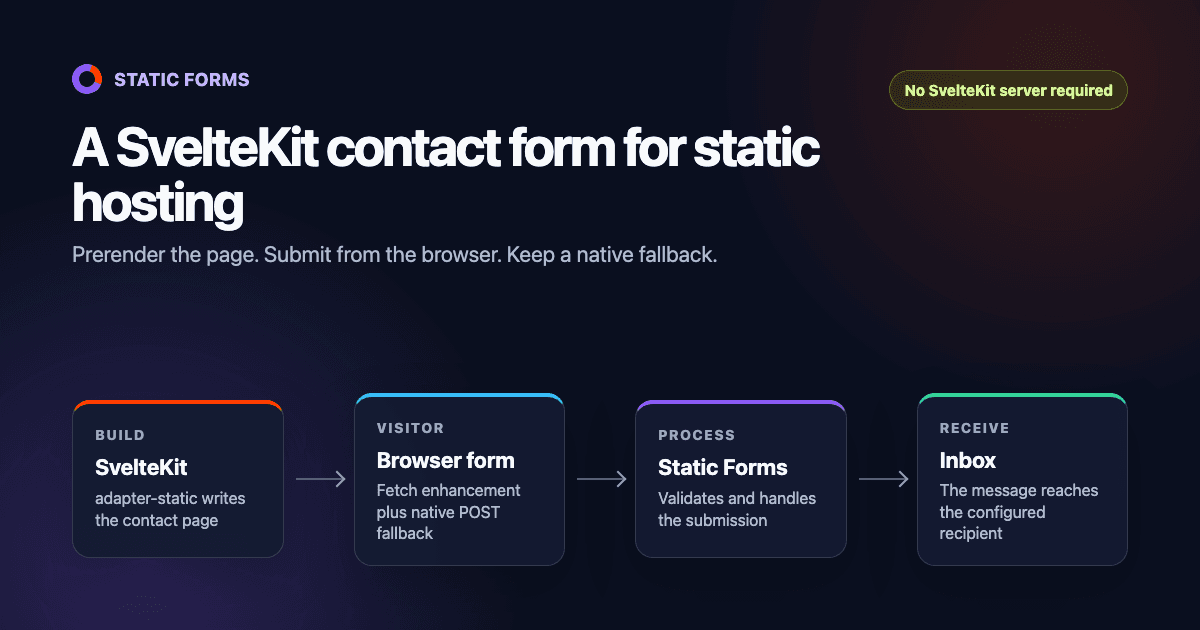
SvelteKit can prerender a contact page, but a static deployment has nowhere to run a +page.server.ts form action. The form below posts to Static Forms instead. It keeps the site fully static, shows an inline result when JavaScript is available, and still redirects to a thank-you page when JavaScript fails to load.
You will add three pieces:
adapter-staticso SvelteKit writes deployable files tobuild;- a contact component with native HTML validation and an accessible status message;
- a hosted form endpoint for processing and email delivery.
The example was compiled with Svelte 5.56, SvelteKit 2.63, and @sveltejs/adapter-static 3.0. It passed svelte-check without warnings and produced a static build.
Why a SvelteKit form action is the wrong fit here
SvelteKit form actions live in +page.server.js or +page.server.ts. As the SvelteKit form-actions documentation explains, a browser POST invokes code on the server. That is useful on a Node, serverless, or edge deployment.
adapter-static works differently. It prerenders the site as HTML, CSS, and JavaScript files. There is no SvelteKit server left after the build, so a server action cannot receive a production submission. The official static-site generation guide recommends a different adapter when some routes need server rendering.
A hosted endpoint fits when you want the rest of the project to stay static. If the form must write to your own database, read a private session, or run business logic before accepting data, use a server-capable adapter and a server action instead.
What you need
Start with an existing SvelteKit project and a form created in the Static Forms dashboard. Copy its API key.
The form API key will appear in the generated HTML. That is expected: a browser needs it to identify the form. Do not put server credentials, webhook secrets, or private API tokens in a Svelte component. If another site should not use your form key, configure domain restriction after the production hostname is ready.
Configure SvelteKit for a static build
Install the static adapter:
npm install --save-dev @sveltejs/adapter-staticA fresh SvelteKit project created by the current sv CLI configures its adapter in vite.config.ts. Replace adapter-auto with adapter-static while keeping any other plugins or compiler options your project already has:
import adapter from '@sveltejs/adapter-static';
import { sveltekit } from '@sveltejs/kit/vite';
import { defineConfig } from 'vite';

export default defineConfig({
  plugins: [
    sveltekit({
      adapter: adapter()
    })
  ]
});
Projects created with an older SvelteKit setup may put adapter under kit in svelte.config.js. Do not configure it in both places. Follow the structure already present in the project and the current SvelteKit adapter documentation.
Then create src/routes/+layout.ts:
export const prerender = true;
export const trailingSlash = 'always';
prerender tells SvelteKit to generate static files for every reachable route. trailingSlash = 'always' produces paths such as contact/index.html, which avoids routing surprises on hosts that do not map /contact to contact.html.
Add the contact page
Create src/routes/contact/+page.svelte and paste this component:
<script lang="ts">
  type SubmitState = 'idle' | 'sending' | 'success' | 'error';
  type SubmitResult = { success?: boolean; message?: string; error?: string };

  let submitState = $state('idle' as SubmitState);
  let statusMessage = $state('');

  async function handleSubmit(event: SubmitEvent) {
    event.preventDefault();

    const form = event.currentTarget as HTMLFormElement;
    if (submitState === 'sending') return;

    submitState = 'sending';
    statusMessage = 'Sending your message...';

    try {
      const response = await fetch(form.action, {
        method: 'POST',
        body: new FormData(form),
        headers: { Accept: 'application/json' }
      });
      const result = (await response.json()) as SubmitResult;

      if (!response.ok || !result.success) {
        throw new Error(result.error || 'The form could not be submitted.');
      }

      form.reset();
      submitState = 'success';
      statusMessage = 'Thanks. Your message has been sent.';
    } catch (error) {
      submitState = 'error';
      statusMessage =
        error instanceof Error ? error.message : 'The form could not be submitted.';
    }
  }
</script>

<svelte:head>
  <title>Contact us</title>
  <meta name="description" content="Send our team a message." />
</svelte:head>

<section class="contact" aria-labelledby="contact-heading">
  <h1 id="contact-heading">Contact us</h1>
  <p>Send a message and we will reply by email.</p>

  <form
    action="https://api.staticforms.dev/submit"
    method="POST"
    onsubmit={handleSubmit}
  >
    <input type="hidden" name="apiKey" value="YOUR_API_KEY" />
    <input
      type="hidden"
      name="redirectTo"
      value="https://example.com/contact/thanks/"
    />

    <div class="honeypot" aria-hidden="true">
      <label for="website">Leave this field empty</label>
      <input id="website" name="honeypot" type="text" tabindex="-1" autocomplete="off" />
    </div>

    <label for="name">Name</label>
    <input id="name" name="name" type="text" autocomplete="name" required />

    <label for="email">Email</label>
    <input id="email" name="email" type="email" autocomplete="email" required />

    <label for="message">Message</label>
    <textarea id="message" name="message" rows="7" minlength="10" required></textarea>

    <button type="submit" disabled={submitState === 'sending'}>
      {submitState === 'sending' ? 'Sending...' : 'Send message'}
    </button>

    <p class:error={submitState === 'error'} aria-live="polite" aria-atomic="true">
      {statusMessage}
    </p>
  </form>
</section>

<style>
  .contact {
    width: min(100% - 2rem, 42rem);
    margin: 4rem auto;
  }

  form {
    display: grid;
    gap: 0.65rem;
    padding: clamp(1.25rem, 4vw, 2.5rem);
    border: 1px solid #d6d3e2;
    border-radius: 1rem;
  }

  label {
    margin-top: 0.6rem;
    font-weight: 650;
  }

  input,
  textarea,
  button {
    box-sizing: border-box;
    width: 100%;
    font: inherit;
  }

  input,
  textarea {
    padding: 0.8rem;
    border: 1px solid #817b91;
    border-radius: 0.5rem;
  }

  input:focus,
  textarea:focus,
  button:focus-visible {
    outline: 3px solid rgb(124 58 237 / 30%);
    outline-offset: 2px;
  }

  textarea {
    resize: vertical;
  }

  button {
    margin-top: 1rem;
    padding: 0.85rem 1rem;
    color: white;
    background: #6d28d9;
    border: 0;
    border-radius: 0.5rem;
    font-weight: 700;
    cursor: pointer;
  }

  button:disabled {
    cursor: wait;
    opacity: 0.65;
  }

  .error {
    color: #b42318;
  }

  .honeypot {
    position: absolute;
    left: -10000px;
    width: 1px;
    height: 1px;
    overflow: hidden;
  }
</style>
Replace YOUR_API_KEY and the example.com thank-you URL. Every submitted control needs a name; an id alone does not put the value into FormData.
The JavaScript path sends FormData and asks for JSON. It disables the button during the request, checks both the HTTP status and response body, and announces the result through a live region. If JavaScript never starts, the browser follows the form's native action. A successful native submission uses redirectTo, so the form still has a usable fallback.
The honeypot is a text input moved off screen, not type="hidden". Static Forms rejects a submission when a field whose name contains honeypot has a value. It stops basic form-filling bots, but it is not a complete spam defense. The honeypot guide covers stronger options and a safe test procedure.
Add the fallback thank-you page
Create src/routes/contact/thanks/+page.svelte:
<svelte:head>
  <title>Message received</title>
</svelte:head>

<h1>Thanks. Your message has been sent.</h1>
<p>We will reply as soon as we can.</p>
<p><a href="/">Return to the home page</a></p>
Keep the absolute redirectTo URL in the form aligned with this route. Preview and production deployments usually have different hostnames, so a hardcoded production redirect may leave a preview after submission. That is acceptable for a final production test, but it can be confusing during development.
Build and test the result
Run the same checks used by the deployment:
npm run check
npm run build
With the default static-adapter settings, the finished site is in build. Confirm that build/contact/index.html and build/contact/thanks/index.html exist before uploading that directory.
Then test from the deployed URL:
- Submit a valid message and confirm the inline success text appears.
- Check that the submission appears in the Static Forms inbox and reaches the recipient email.
- Disable JavaScript, submit again, and confirm the browser reaches
/contact/thanks/. - Try an invalid email and a message shorter than ten characters. The browser should stop both.
- Press Tab through the form and make sure the focus outline remains visible.
- Click Send twice quickly. The disabled state should prevent a second client-side request.
A local success does not prove the production form works. Domain allowlists, Content Security Policy headers, and stale static artifacts only show up after deployment.
Troubleshooting
| Symptom | Likely cause | Check |
|---|---|---|
| The build says a route cannot be prerendered | A page or endpoint still depends on server-only data | Remove the dependency or use a server-capable adapter for that route |
| The button says the API key is invalid | YOUR_API_KEY survived the build or the key belongs to another form |
Inspect the generated HTML and copy the current key from the dashboard |
| Fetch fails in the browser | A CSP blocks the API or a proxy changed the request | Check DevTools, then allow https://api.staticforms.dev in connect-src |
| Native submission is blocked by CSP | form-action does not permit the endpoint |
Add https://api.staticforms.dev to form-action without replacing the rest of the policy |
| It works locally but fails in production | The deployed hostname is missing from domain restriction | Add the production hostname and any preview hostname you still use |
| The fallback redirects to 404 | The absolute redirectTo URL and generated route do not match |
Inspect build/contact/thanks/index.html and correct the URL |
| A field is absent from the email | The control has no name attribute |
Give each submitted control a stable, unique name |
A strict policy for this page needs both destinations because the enhanced and native paths use different directives:
Content-Security-Policy: default-src 'self'; connect-src 'self' https://api.staticforms.dev; form-action 'self' https://api.staticforms.devMerge those sources into the site's existing policy. Do not replace a working production CSP with this short example without accounting for the site's scripts, images, fonts, and other connections.
Common questions
Can I remove the JavaScript handler?
Yes. Keep the form action, method, apiKey, and redirectTo fields, then remove onsubmit={handleSubmit} and the script block. The browser will submit the form and follow the success redirect. You will lose the inline loading and error states, but the contact form will still work on a static host.
Should the form API key come from an environment variable?
An environment variable used while building a static page is compiled into the public output. It can help you use different form keys for preview and production builds, but it does not make the key secret. Never expose a webhook token or other server credential this way. Domain restriction is the control that limits which websites may submit with a browser-visible form key.
Will this work on Cloudflare Pages, Netlify, Vercel, or GitHub Pages?
Yes, provided the host serves the generated build directory and routes trailing-slash URLs to index.html. The form request goes from the visitor's browser to Static Forms, so the static host does not need a function. GitHub Pages projects deployed under a repository subpath also need SvelteKit's paths.base configured correctly; follow the adapter's GitHub Pages section rather than assuming the site is mounted at /.
When to use another approach
Use this endpoint pattern when the contact page should remain portable across static hosts and the browser can send the fields directly. The Static Forms Svelte guide has a shorter framework reference, while the form basics documentation lists supported field names and validation attributes.
Choose a SvelteKit server action when you need authenticated user context, private credentials, a same-origin workflow, or custom server-side logic before the submission is accepted. In that case, deploy with an adapter that provides a runtime. A static adapter cannot execute server code after the build, no matter how the form is written.
Related Articles
Next.js Server Actions vs a Form Endpoint for Contact Forms
Compare Next.js Server Actions and managed form endpoints with tested contact form code, static export limits, security checks, and deployment trade-offs.
Build a Custom Shopify Contact Form Section in Liquid
Build a reusable Shopify contact form section in Liquid. Add custom fields, accessible errors, native hCaptcha, theme settings, and a storefront test.
Use a Custom Squarespace Form Without Losing Your Styling
Add a custom Squarespace contact form that keeps your site styling. Use tested HTML, a thank-you page, accessible focus states, and production checks.




































