


Static Site Form Services With Spam Protection (2026)
Choosing a static site form service with spam protection means reading past the words "spam protection", because every vendor uses them. The useful questions are narrower. Which CAPTCHAs can you turn on? Can you lock the form to your own domain? Does a blocked message vanish, or can you get it back? And which plan do you need for each answer?
This post puts eight services in one matrix and answers those questions from each vendor's own pages, read on 3 November 2026.
We make Static Forms, one of the eight, so read this as our take. The services appear in alphabetical order, and we don't rank them. "Not stated" means we couldn't find it on the vendor's pages, and it doesn't mean the vendor lacks the feature. Plan names come from the vendor's own pricing, plans, docs or llms.txt pages. A feature lists no plan when none of those pages states one.
There are no prices here. Our form backend comparison covers free tiers, paid plans and uploads.
What spam protection covers on a form service
Your form's endpoint sits in your public HTML, so a bot can read the address and post to it without loading your page. Hosted form services answer that with five kinds of control, and each one catches a different kind of abuse:
- Honeypot: a hidden field that people leave empty and simple bots fill in. It adds no friction, and a script that reads your HTML can skip it.
- CAPTCHA: a challenge token the server verifies. It stops scripts that post directly to the endpoint, and it adds a third-party script or a proof-of-work step to your page.
- Server-side spam filter: a check on the content of each message. It's your main defense against a person pasting an SEO pitch, which passes every bot check.
- Domain restriction: an allowlist checked against the
OriginorRefererheader. It stops other websites from reusing your form key in a browser. A script can forge those headers, so it won't stop a determined bot. - Rate limit: a cap on requests over time. It limits a flood and says nothing about whether a single message is spam.
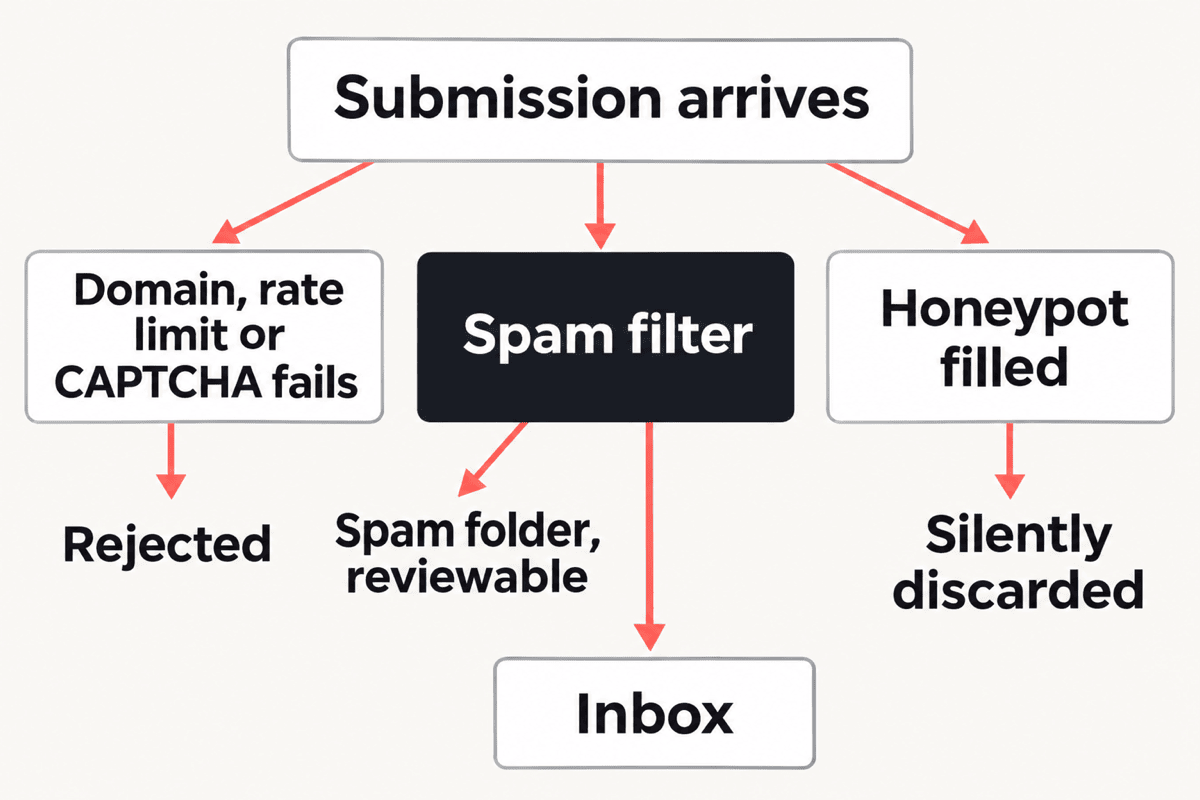
The diagram shows the outcomes, not the order of the checks. Services differ on what happens to a blocked message, and the second table below shows where.
Spam protection compared across eight form services
Checked 3 November 2026.
| Service | Honeypot | CAPTCHA options | Server-side spam filter | Domain restriction | Rate limit |
|---|---|---|---|---|---|
| Basin | Yes; custom names on Growth and up | reCAPTCHA v2/v3, hCaptcha, Turnstile; plan not readable | Basic on Free, Starter and Growth; advanced on Pro and Agency | "Restrict to Domain" listed; plan not readable | Not stated |
| Formcarry | _gotcha field; plan not stated |
reCAPTCHA; plan not stated | Its own detection, on every plan | Not stated | Not stated |
| Forminit (formerly Getform) | _gotcha or a custom name; plan not stated |
Turnstile, reCAPTCHA v3, hCaptcha; plan not stated | Built in on Free and up; AI Classify step, 1 per workflow on Free, up to 5 on Pro and Business | Authorized domains; plan not stated | 1 request per 5 seconds per IP without an API key, all plans |
| Formspree | _gotcha field; no plan named; custom names on Business and Custom |
reCAPTCHA on every plan; changelog adds reCAPTCHA v3, hCaptcha and Turnstile with no plan named | Formshield on every plan; sensitivity controls on Professional and up; custom rules on Business and up | Every plan, including Free | Not stated |
| FormSubmit | _honey field |
reCAPTCHA, on by default | _blacklist phrase list |
Not stated | Not stated for submissions |
| Netlify Forms | netlify-honeypot attribute; plan not stated |
reCAPTCHA 2, Netlify's or your own keys; plan not stated | Akismet on all submissions; plan not stated | Not stated | Not stated |
| Static Forms | Any field name containing honeypot, every plan |
reCAPTCHA v2 on every plan; v3, Turnstile, hCaptcha, Altcha (Starter and up) | AI or classic filter, three levels, every plan | Starter and up | Free: 10 a minute per account, 30 an hour per API key. Starter: 15 and 60. Pro and Agency: 20 and 100 |
| Web3Forms | Free; its honeypot page is headed "NOT RECOMMENDED" | hCaptcha on Free; reCAPTCHA v3 and Turnstile on Pro | Server-side check on all submissions | Pro | Not stated |
FormSubmit's site lists no paid plans, so its row has no plan names. The rate-limit column isn't measured on one basis: Forminit's limit is per IP, and ours is per account for the minute and per API key for the hour.
What happens to a blocked submission
The matrix tells you which controls exist. This table tells you what happens to a message when one of them fires, which decides whether a false positive costs you a lead.
| Service | Filled honeypot | Flagged by the filter | Wrong domain |
|---|---|---|---|
| Basin | Not stated | Spam folder, permanently deleted 60 days after it was last changed | Not stated |
| Formcarry | Treated as spam | Marked as spam, kept in your account, hidden from the default view (no deletion date stated) | Not stated |
| Forminit | Flagged as spam and rejected | Spam folder, deleted after 30 days | Flagged and sent to Spam, still recoverable |
| Formspree | Ignored without an error | Blocked from your inbox | Blocked |
| FormSubmit | Ignored without an error | Phrase matches are discarded | Not stated |
| Netlify Forms | Rejected without an error | Spam submissions list, and you can change a message's state | Not stated |
| Static Forms | Discarded, and the sender sees a normal success response | Spam tab, recoverable, deleted after 15 days | Rejected with a 403 |
| Web3Forms | Not stated | Not stated | Not stated |
Forminit's domain check differs from the others we could read. An unlisted domain lands in your Spam folder on Forminit, so a misconfigured preview URL costs you some triage. On Static Forms the same request fails with a 403 and leaves you nothing to recover.
A silent honeypot has its own failure mode. If a password manager or browser autofill fills the hidden field, a real visitor sees success and you get nothing. On Static Forms, Formspree, FormSubmit and Netlify Forms, the docs describe no error for the sender in that case, so test autofill before launch.
What the tables can't tell you
Web3Forms. Its pricing page returned a 403 on 3 November 2026, so we couldn't read it. The plan gates in the table come from its llms.txt and docs instead: honeypot and hCaptcha on Free, reCAPTCHA v3 and Turnstile on Pro, and domain restriction on Pro. Its sources also disagree about the honeypot: the honeypot docs page is headed "NOT RECOMMENDED" and suggests a captcha instead, while its llms.txt still lists one on Free.
Basin. Its pricing page lists each spam control in a compare table, but we couldn't read the plan columns for CAPTCHAs and domain restriction from the page text. Its Free card says "basic spam protection", and Pro lists "advanced spam filtering".
Formspree. The plans page names reCAPTCHA only. Its changelog added hCaptcha in August 2024, reCAPTCHA v3 scoring in August 2025 and Turnstile in November 2025, without naming plans.
Formcarry and Forminit. Their pricing pages don't list CAPTCHAs or honeypots by plan, and Formcarry's docs name no plan for either, so check before you rely on one on a free plan. Formcarry's docs say spam submissions count toward the monthly limit on its free plan.
Static Forms. The honeypot only triggers on a name containing honeypot, so a bot that skips that word gets past it. Our honeypot docs have the details.
Which form service fits which spam problem
Each pick comes from what the vendors' pages show.
- Other sites are reusing your form key, and you're on a free plan: Formspree. Its plans page includes "Restrict to domain" on Free. Static Forms has it (Starter and up).
- You want a CAPTCHA with no third-party challenge account: Static Forms. Altcha is Starter and up, and no other service's pages that we read name it. Our CAPTCHA comparison explains the request path, including the parts Static Forms operates.
- People keep pasting sales pitches, and you don't want to pay to tune the filter: Static Forms. Three filter levels are on every plan. Formspree's sensitivity controls start on Professional.
- You want your own blocked-phrase list: FormSubmit, Formspree or Basin. FormSubmit has
_blacklistwith no account, Formspree has custom rules on Business, and Basin lists a custom content filter on Pro. - Spam comes from countries you don't serve: Basin. It lists location filtering on Pro.
- You can't afford to lose a false positive: Basin, Formcarry, Forminit, Netlify Forms or Static Forms. All five keep flagged messages where you can review them. Basin deletes them 60 days after they were last changed, Forminit after 30 days and Static Forms after 15. Formcarry states no deletion date.
- Your site lives on Netlify: Netlify Forms. Akismet filters every submission, and you add a honeypot or reCAPTCHA 2 with attributes on the form.
- You want a short-lived form with no account: FormSubmit. reCAPTCHA is on by default and the site says no registration is required.
For a quiet brochure site, you may not need a challenge at all. Our guide on when a honeypot is enough gives a rollout plan and the signals that tell you to escalate.
When another service is the better choice
Static Forms is the wrong pick in these cases:
- You need domain restriction for free. Ours is Starter and up, and Formspree includes it on Free.
- You need Turnstile or hCaptcha on Free. Our Free plan has reCAPTCHA v2 and the honeypot. Turnstile and hCaptcha are Starter and up.
- You want a longer spam review window. Basin keeps spam up to 60 days, Forminit 30, and Formcarry states no deletion. We delete after 15.
- You want a custom honeypot name today. Forminit documents one in its form settings, and Formspree and Basin list one too. Our docs only cover names containing
honeypot. - You need your own phrase list or a country filter. Our spam filter docs describe levels, and neither of those. See the picks above.
- You'd rather no AI model read your submissions. Our default filter sends the fields it needs to an AI provider, with sensitive fields removed and email addresses masked. You can switch any form to the classic filter, which checks the sender's IP, email and message against a reputation network instead. Netlify's Akismet filter and FormSubmit's phrase list are other non-AI-labelled options.
If your current service keeps spam under control, stay where you are. Changing means editing each form's endpoint and key, and spam settings don't move with you.
When Static Forms is the better choice
- You want the filter settings on a free plan. The spam filter offers AI or classic checks and three levels on every plan.
- You want the limits written down. The FAQ lists the per-minute rate limit for each plan. Among the other services, we only found a published rate limit on Forminit's pages.
- You want a hard rejection for wrong domains. Domain restriction is Starter and up and returns a 403 instead of filing the message.
- You want Altcha without running a server. It's Starter and up, and the security docs cover it alongside the other providers.
How to test a form service's spam protection
Whichever service you shortlist, try to get past it before you trust it. These commands target Static Forms, and you can adapt them to another vendor's endpoint and field names. We wrote them from our API docs and didn't run them for this post. Use a throwaway test form, because accepted submissions count toward your quota.
Fill the honeypot. The response should look like a success, and nothing should reach your inbox.
curl -i -X POST https://api.staticforms.dev/submit \
  -H "Content-Type: application/json" \
  -H "Accept: application/json" \
  -d '{"apiKey":"YOUR_API_KEY","name":"Test","email":"test@example.com","message":"Honeypot test","honeypot":"filled"}'
Post from the wrong domain. With domain restriction on, this should return a 403.
curl -i -X POST https://api.staticforms.dev/submit \
  -H "Content-Type: application/json" \
  -H "Accept: application/json" \
  -H "Origin: https://not-your-site.example" \
  -d '{"apiKey":"YOUR_API_KEY","name":"Test","email":"test@example.com","message":"Domain test"}'
Skip the CAPTCHA. With a CAPTCHA on, run the domain test's request from an allowed origin and without a token. It should fail with a CAPTCHA error.
Send a burst. This posts 12 requests and prints each status code. On Free, you should see a 429 after the tenth in a minute.
for i in $(seq 1 12); do
  curl -s -o /dev/null -w "%{http_code}\n" -X POST https://api.staticforms.dev/submit \
    -H "Content-Type: application/json" \
    -d "{\"apiKey\":\"YOUR_API_KEY\",\"name\":\"Test\",\"email\":\"test@example.com\",\"message\":\"Burst test $i\"}"
done
Try it as a person. Submit the real page with your browser's autofill and your password manager. Then send one message that reads like an SEO pitch, and check your inbox and Spam tab.
Here is a complete page with the honeypot in place. Replace YOUR_API_KEY with the key from your form's General tab and redirectTo with a page on your site.
<!DOCTYPE html>
<html lang="en">
<head>
  <meta charset="UTF-8">
  <meta name="viewport" content="width=device-width, initial-scale=1.0">
  <title>Contact</title>
</head>
<body>
  <form action="https://api.staticforms.dev/submit" method="POST">
    <input type="hidden" name="apiKey" value="YOUR_API_KEY">
    <input type="hidden" name="redirectTo" value="https://example.com/thank-you.html">

    <label for="name">Name</label>
    <input id="name" name="name" type="text" required autocomplete="name">

    <label for="email">Email</label>
    <input id="email" name="email" type="email" required autocomplete="email">

    <label for="message">Message</label>
    <textarea id="message" name="message" rows="5" required></textarea>

    <input type="text" name="honeypot" style="display:none" tabindex="-1" autocomplete="off">

    <button type="submit">Send</button>
  </form>
</body>
</html>
FAQ
Which form service has the best spam protection for a static site?
We can't name a fair single winner, because we found no comparable block rates on the pages we read. Pick by the abuse you see. Formspree suits a free plan that needs a domain lock, Static Forms suits free filter controls and Altcha (Starter and up), and Netlify Forms suits sites already on Netlify.
Do I need a CAPTCHA on a static site contact form?
Not always. A low-traffic form can start with a honeypot, a domain allowlist and a server-side filter. Add a CAPTCHA if spam keeps reaching your inbox or if one submission can trigger a costly action.
Which form services include spam protection on a free plan?
Formspree lists Formshield, reCAPTCHA and domain restriction on Free. Forminit and Basin list built-in or basic spam protection on Free. Static Forms has the honeypot, reCAPTCHA v2 and the spam filter on Free, and its domain restriction is Starter and up. FormSubmit's site lists no paid plans.
Does domain restriction stop bots?
It stops other websites from using your key in a browser. A script can send any Origin header it likes, so pair the allowlist with a CAPTCHA or a filter.
Sources for this comparison
All checked 3 November 2026. We don't link to these sites, so copy the address if you want to read them.
- Basin: usebasin.com/pricing, docs.usebasin.com/getting-started/spam-protection-basics
- Formcarry: formcarry.com/pricing, formcarry.com/docs/features/spam-protection
- Forminit: forminit.com, forminit.com/pricing, forminit.com/pricing.md, forminit.com/docs/honeypot, forminit.com/docs/authorized-domains
- Formspree: formspree.io/plans, formspree.io/changelog, help.formspree.io/hc/en-us/articles/360013580813-Honeypot-spam-filtering
- FormSubmit: formsubmit.co, formsubmit.co/documentation
- Netlify Forms: docs.netlify.com/manage/forms/spam-filters
- Static Forms: our security docs, spam filter docs and FAQ
- Web3Forms: web3forms.com/pricing (403, not read), web3forms.com/llms.txt, docs.web3forms.com/getting-started/faq, docs.web3forms.com/getting-started/customizations/spam-protection, docs.web3forms.com/getting-started/customizations/spam-protection/spam-protection (the honeypot page)
Plans change, so check the vendor's page before you buy. If you spot a fact that has moved, tell us and we'll fix it.
Try Static Forms
Create a free account and follow the quick start to send your first submission in a few minutes. Then open the form's Security tab and choose your CAPTCHA.
Related Articles
Form Backend Services Compared (2026): Free Tiers and Prices
Eight form backends compared on free submissions, paid plans, uploads, CAPTCHAs and data location. Facts from each vendor's own pages, checked 2 November 2026.
The Best Form Backends for Hugo and Jekyll in 2026
A practical comparison of how to handle contact forms on Hugo and Jekyll sites — the main approaches, their trade-offs, and how to choose the right form backend for a static site.
Formspree vs Web3Forms vs Static Forms (2026): Compared
Formspree vs Web3Forms vs Static Forms on free tiers, paid plans, spam tools, integrations and retention, checked 3 November 2026, and when each one wins.