

Add a Contact Form to Neocities Without PHP
Neocities gives you the good part of the old web: an HTML file, a blank canvas, and no framework telling you where the contact page belongs. The catch is that a static page cannot process a message by itself. You need to post the form to a service that can receive it.
This guide builds a contact page with plain HTML and CSS. It works without PHP or a custom server, keeps browser validation intact, sends submissions to Static Forms, and returns the visitor to a thank-you page on your Neocities site.
How the form works
Neocities describes its service as static web hosting and gives you an in-browser editor plus file uploads.[1][2] That is enough to publish the page, but the form still needs somewhere to send its data.
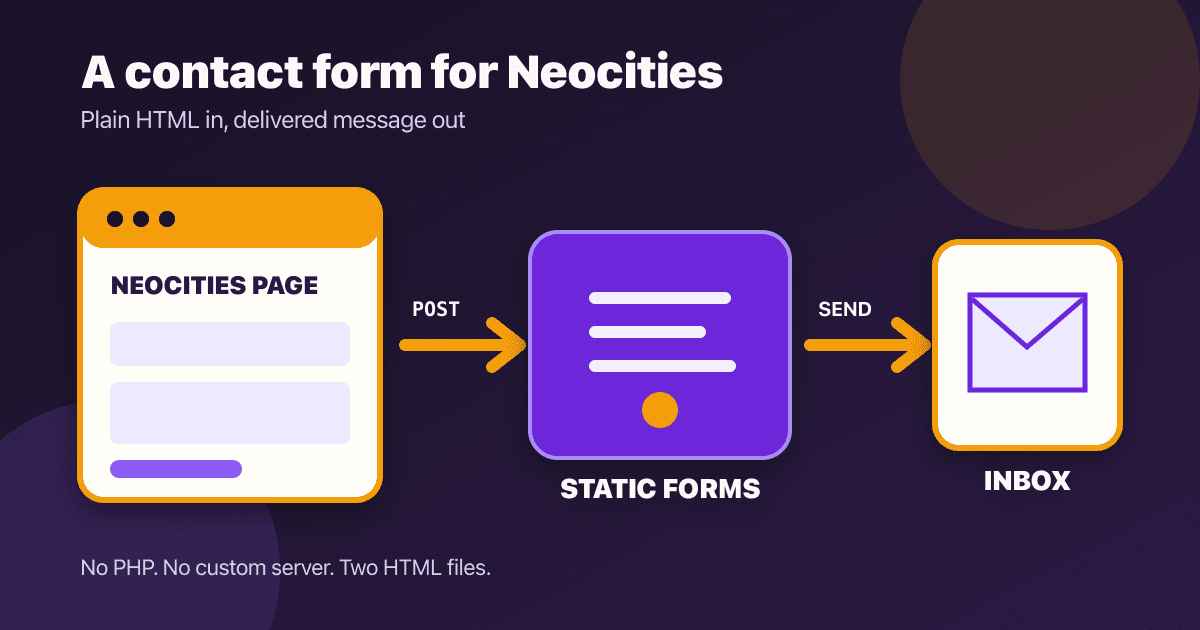
The finished path is short:
- Neocities serves
contact.html. - The browser validates the required fields.
- The browser sends a POST request to
https://api.staticforms.dev/submit. - Static Forms accepts the submission and redirects the visitor to
thanks.html.
HTML forms are designed for this split. The action tells the browser where to send the fields, while method="POST" puts the submitted values in the request body.[5] You do not need JavaScript for this version.
What you need
Before editing your site, prepare:
- a Neocities site;
- a Static Forms account and form key;
- the exact hostname of your site, such as
https://YOUR-SITE.neocities.org; - two files named
contact.htmlandthanks.html.
Static Forms requires the submit URL, POST method, and an apiKey field. It also accepts an optional redirectTo URL after a successful submission.[3]
Your form key will appear in the page source because the visitor's browser has to send it. Treat it as a public form identifier. Never put an email password, Neocities login, webhook secret, or other private credential in an HTML file.
Create the contact page
Create contact.html in the Neocities editor and paste this complete page:
<!doctype html>
<html lang="en">
<head>
  <meta charset="utf-8">
  <meta name="viewport" content="width=device-width, initial-scale=1">
  <title>Contact me</title>
  <style>
    :root {
      color-scheme: light dark;
      font-family: system-ui, sans-serif;
      line-height: 1.5;
    }

    body {
      margin: 0;
      color: #1f2937;
      background: #f5f3ff;
    }

    main {
      width: min(100% - 2rem, 42rem);
      margin: 4rem auto;
    }

    .contact-card {
      padding: clamp(1.25rem, 5vw, 3rem);
      background: #ffffff;
      border: 2px solid #6d28d9;
      border-radius: 1rem;
      box-shadow: 0.5rem 0.5rem 0 #f59e0b;
    }

    h1 {
      margin-top: 0;
    }

    .field {
      margin-top: 1.25rem;
    }

    label {
      display: block;
      margin-bottom: 0.35rem;
      font-weight: 700;
    }

    input,
    textarea,
    button {
      box-sizing: border-box;
      width: 100%;
      font: inherit;
    }

    input,
    textarea {
      padding: 0.75rem;
      color: #111827;
      background: #ffffff;
      border: 1px solid #6b7280;
      border-radius: 0.4rem;
    }

    input:focus-visible,
    textarea:focus-visible,
    button:focus-visible {
      outline: 3px solid #f59e0b;
      outline-offset: 3px;
    }

    textarea {
      min-height: 10rem;
      resize: vertical;
    }

    button {
      margin-top: 1.5rem;
      padding: 0.8rem 1rem;
      color: #ffffff;
      background: #6d28d9;
      border: 0;
      border-radius: 0.4rem;
      font-weight: 800;
      cursor: pointer;
    }

    .honeypot {
      position: absolute;
      left: -10000px;
      width: 1px;
      height: 1px;
      overflow: hidden;
    }

    @media (prefers-color-scheme: dark) {
      body {
        color: #f9fafb;
        background: #171225;
      }

      .contact-card {
        background: #241b35;
        border-color: #a78bfa;
      }
    }
  </style>
</head>
<body>
  <main>
    <section class="contact-card" aria-labelledby="contact-heading">
      <h1 id="contact-heading">Send me a message</h1>
      <p>Use this form for questions about my site. All fields are required.</p>

      <form action="https://api.staticforms.dev/submit" method="POST">
        <input type="hidden" name="apiKey" value="YOUR_API_KEY">
        <input
          type="hidden"
          name="redirectTo"
          value="https://YOUR-SITE.neocities.org/thanks.html"
        >
        <input type="hidden" name="subject" value="Message from my Neocities site">

        <div class="honeypot" aria-hidden="true">
          <label for="website-honeypot">Leave this field empty</label>
          <input
            id="website-honeypot"
            name="website_honeypot"
            type="text"
            tabindex="-1"
            autocomplete="off"
          >
        </div>

        <div class="field">
          <label for="name">Name</label>
          <input id="name" name="name" type="text" autocomplete="name" required>
        </div>

        <div class="field">
          <label for="email">Email address</label>
          <input id="email" name="email" type="email" autocomplete="email" required>
        </div>

        <div class="field">
          <label for="message">Message</label>
          <textarea id="message" name="message" maxlength="5000" required></textarea>
        </div>

        <button type="submit">Send message</button>
      </form>
    </section>
  </main>
</body>
</html>
Replace both placeholders:
YOUR_API_KEYwith the form key from Static Forms;YOUR-SITEwith your Neocities site name.
Keep the redirect URL absolute and use https://. A relative value such as /thanks.html does not identify the destination site when the form is processed by another origin.
Why the markup is deliberately plain
This form leans on the browser instead of rebuilding form behavior in JavaScript. type="email" and required catch common mistakes before a request leaves the page. Every visible field has a label whose for value matches the field's id, which is the explicit association recommended by W3C WAI.[6]
The autocomplete values help browsers fill the name and email fields. The focus outline stays visible for keyboard users. On small screens, the card and controls fit the viewport without a fixed width.
The offscreen field is a honeypot. Static Forms treats a field whose name contains honeypot as a spam trap and silently rejects submissions when that field has a value.[4] A honeypot stops simple bots, not determined abuse. If spam becomes persistent, review the stronger controls in the Static Forms spam-protection docs rather than adding a puzzle to the page without a plan.
Add the thank-you page
Create thanks.html beside the contact page:
<!doctype html>
<html lang="en">
<head>
  <meta charset="utf-8">
  <meta name="viewport" content="width=device-width, initial-scale=1">
  <title>Message received</title>
  <style>
    body {
      max-width: 42rem;
      margin: 4rem auto;
      padding: 0 1rem;
      font: 1.1rem/1.6 system-ui, sans-serif;
    }

    a:focus-visible {
      outline: 3px solid #f59e0b;
      outline-offset: 3px;
    }
  </style>
</head>
<body>
  <main>
    <h1>Message received</h1>
    <p>Thanks. Your message reached the form service.</p>
    <p><a href="index.html">Return to the home page</a></p>
  </main>
</body>
</html>
That wording is intentionally narrow. The redirect proves that the form service accepted the request. It does not prove that a notification reached an inbox or that somebody has read the message. If you publish a response-time promise, use one you can consistently meet. W3C's forms guidance recommends clear success and error feedback so people know whether the task completed.[7]
For more confirmation-page ideas, see these contact form success message examples.
Publish both files on Neocities
Open the Neocities dashboard, then upload or save contact.html and thanks.html. Neocities' official tutorial describes the dashboard as the place to edit pages, upload files, and add new pages.[2]
Open the public URL directly:
https://YOUR-SITE.neocities.org/contact.htmlDo not test only inside an editor preview. The final hostname matters because your redirectTo value must point to a real public page.
Add a normal link wherever visitors should find the form:
<a href="contact.html">Contact me</a>Test the whole submission path
A published form is not finished until one real message makes it through. Use a recognizable marker such as Neocities launch test 2026-09-17, then check each boundary:
- Submit the empty form. The browser should focus a required field and send no request.
- Enter an invalid email address. The browser should block submission again.
- Fill all three visible fields and submit once.
- Confirm the browser lands on your public
thanks.htmlpage. - Open the Static Forms inbox and find the unique marker.
- Check the configured recipient mailbox and its spam folder.
The redirect, stored submission, and email notification prove different things. If the redirect works but no email arrives, the form request probably succeeded and the problem is farther down the delivery path.
Fix the common failures
The form opens a Neocities error page
Check the opening <form> tag. The action must be exactly https://api.staticforms.dev/submit, and the method must be POST. Static Forms does not accept GET for this endpoint.[3]
The service says the form key is missing
Confirm that the hidden field is inside the form and keeps the exact name apiKey. Replace the placeholder with the key shown in your Static Forms account.
The redirect goes to the wrong place
Open thanks.html directly from the public site, copy that full URL, and use it as the redirectTo value. Watch for an old Neocities username, a missing .html, or http:// instead of https://.
A field is absent from the submission
A form control needs a name attribute to be sent. An id connects the control to its label, but it does not name the submitted value.[5]
Real messages disappear
Make sure the honeypot remains empty and offscreen. Browser autofill should not touch it because the example uses autocomplete="off". Test once with the field empty, then use browser developer tools to fill it and confirm that the spam trap rejects that second test.[4]
The page says success but no email arrives
Check the Static Forms inbox first. If the submission is there, inspect delivery status and mailbox filtering. The contact form email troubleshooting guide follows that path without guessing.
Know the limits of a public contact form
Collect only what you need. A basic personal-site contact form rarely needs a phone number, home address, attachment, or date of birth. Do not ask visitors to submit passwords, payment details, medical records, or other sensitive material through a general contact box.
Browser validation is useful feedback, but it is not a security boundary. The receiving service still has to validate and safely handle untrusted values.[5] The same rule applies to anything you later forward into email, a webhook, or another system.
If you want inline success and error messages without leaving the page, JavaScript fetch() can do that, but it adds loading-state, retry, duplicate-submit, and accessibility work. Start with the native redirect version. It is easier to inspect when something breaks, and it suits the hand-built feel of a Neocities site.
Final check before sharing the page
- Both HTML files load from the public Neocities hostname.
- Every visible control has a label.
- The empty and invalid-email tests stay on the page.
- One valid test reaches the thank-you page.
- The same test appears in the Static Forms inbox.
- The recipient mailbox receives the notification.
- The form works at a narrow mobile width and with keyboard navigation.
- No private credential appears in the page source.
If those checks pass, link contact.html from your navigation and you are done. The Static Forms form basics page is the canonical reference if you add fields later.
Sources
Related Articles
Add a Contact Form to Hexo Without a Backend
Add a no-JavaScript contact form to Hexo, keep it outside fragile theme files, inspect the generated HTML, and test the deployed form safely.
Add a Contact Form to Ghost Without Editing Your Theme
Add a working contact form to Ghost with an HTML card, accessible fields, a thank-you page, spam protection, and a published-page test plan.
Build a Vite Contact Form Without a Backend
Build a Vite contact form with native validation, a hosted endpoint, safe environment variables, clear status messages, and production testing.







































