

Connect a Framer Form to Email and a Webhook
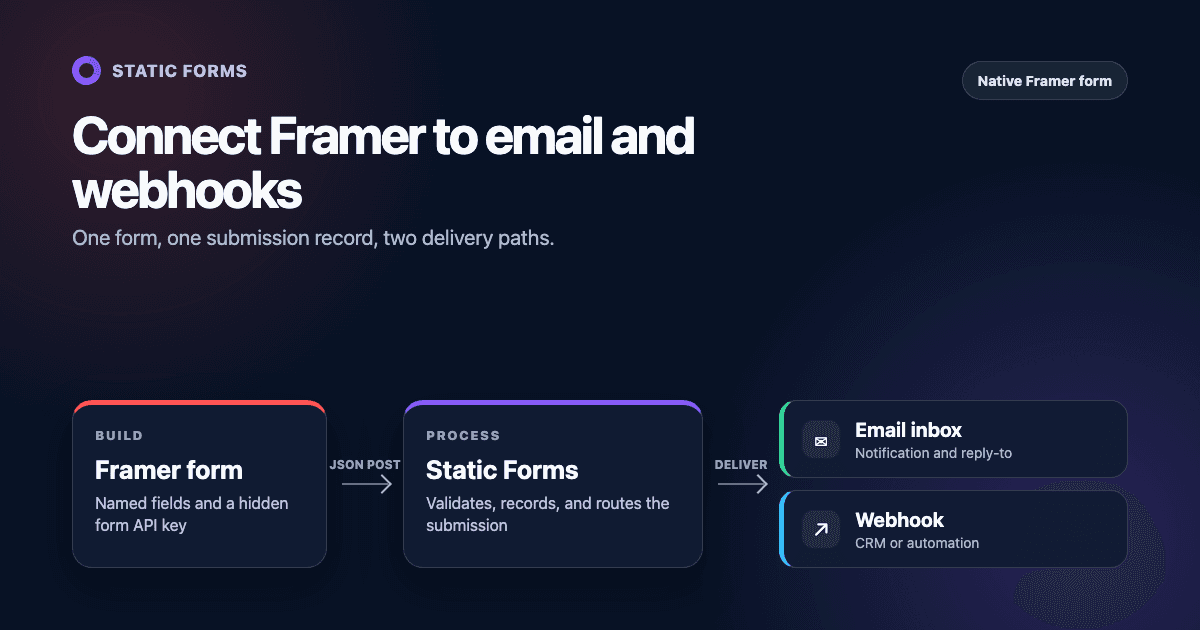
Framer's native Form component can submit JSON to an HTTPS webhook. Send it to Static Forms with the form API key in a hidden field. Static Forms records the submission and sends the notification email; it can also forward the data to another webhook.
The form and its success state stay in Framer, so you do not need to build or host a form endpoint.
The finished submission flow
The form takes this path:
- A visitor submits the native form on your published Framer site.
- Framer sends the named fields to
https://api.staticforms.dev/submitas JSON. - Static Forms validates the request, records the submission, and sends the configured email notification.
- If you enable a delivery webhook in Static Forms, it forwards a structured
form.submittedevent to your CRM, automation, or application.
Framer can send to email, Google Sheets, or a custom webhook on its own. Use the two-step route when you want submissions stored in the Static Forms inbox, or when several sites need to share the same downstream webhook configuration.
What you need
Before opening the Framer editor, create a form in the Static Forms dashboard and copy its API key. The key will be part of the form submission, so it is a public form identifier rather than a server password.
You also need:
- a Framer site with a native Form component;
- per-submission email notifications enabled for the Static Forms account;
- a public HTTPS receiver if you plan to forward submissions to another webhook.
Custom HTTP webhooks in Static Forms are available on Starter and higher plans. Check the current pricing page instead of relying on a copied plan table.
Static Forms sends the primary notification to the account email, or to the workspace owner's email in a team workspace. Before testing, open Account → Notifications and confirm that per-submission notifications are enabled. Additional recipients can be added as verified CC addresses under the form's Delivery settings. The notification guide and delivery guide cover both settings.
Connect the native Framer form
Open Insert, choose Forms, and drag a form onto the page.
Give every visible field a short, stable Name. Framer uses that property as the JSON key sent to destinations. The Name does not replace an accessible label: keep a persistent label on every visible control and do not rely on placeholder text alone. A contact form might use:
| Framer field | Name | Example value |
|---|---|---|
| Name | name |
Ada Lovelace |
email |
ada@example.com |
|
| Message | message |
Can we discuss a project? |
| Consent checkbox | consent |
true |
Keep the email field's name lowercase as email. Static Forms recognizes it as the submitter's address and can use it as the notification's reply-to address.
Add a hidden field with this exact name:
Name: apiKey
Value: YOUR_STATIC_FORMS_API_KEY
Replace the placeholder with the key for the intended form. Framer includes hidden fields in webhook requests, so a submission should resemble this:
{
  "name": "Ada Lovelace",
  "email": "ada@example.com",
  "message": "Can we discuss a project?",
  "consent": true,
  "apiKey": "YOUR_STATIC_FORMS_API_KEY"
}
The order of JSON properties does not matter.
Select the whole form. In the right sidebar, click Add... beside Send To, choose Webhook, and enter:
https://api.staticforms.dev/submitFramer requires an HTTPS URL. It sends an HTTP POST and expects the destination to return a direct 2xx response. Static Forms returns JSON for this request, including "success": true when it accepts the submission. That response confirms acceptance; it does not prove that the later email or downstream webhook delivery succeeded.
Do not add a redirectTo field to this native webhook request. Static Forms implements that field with an HTTP 303 redirect, while Framer explicitly says its webhook sender does not follow 3xx responses. Use Framer's own success redirect, overlay, button variant, or form variant instead.
Framer can add an HMAC-SHA256 signature in Framer-Signature, alongside Framer-Webhook-Submission-Id. Static Forms does not validate those Framer headers on /submit, so enabling signing does not authenticate this hop. The apiKey is a public identifier, not an authentication secret. If verified Framer signatures are mandatory, send Framer to a receiver that verifies them instead of directly to /submit.
Set the success and error experience in Framer
After Static Forms accepts the request, Framer still needs to tell the visitor whether the submission succeeded.
Framer supports several form outcomes: redirect to another page, open an overlay, update the submit button, or switch the whole form to another variant. Configure both success and error states with messages that tell the visitor what happened:
- Success:
Message received. We'll reply within one business day. - Error:
We couldn't send your message. Try again, or email support@example.com.Replace that example address with a monitored mailbox before publishing.
Do not show success when a button is merely clicked. Tie it to Framer's form success state, which follows a successful destination response. Keep keyboard focus visible, do not rely on color alone, and confirm that new success or error text is announced by a screen reader. If an overlay or form variant replaces the form, move focus to its heading or status message where Framer's interaction settings permit it.
Run the final test on the published site rather than relying on Preview.
Forward the submission to another webhook
If email is the only destination you need, skip this section. To send the accepted submission to an application or automation, open the form in Static Forms and go to Delivery → Webhook.
Enter the receiver's HTTPS URL, enable the webhook, and choose an authentication method. Static Forms supports Bearer auth, Basic auth, and a custom API-key header. If you control the receiver, Bearer authentication is easy to configure: store the token in a server environment variable, not in Framer or browser code.
Static Forms sends an event shaped like this:
{
  "event": "form.submitted",
  "timestamp": 1787300000,
  "data": {
    "submissionId": "submission-id",
    "formData": {
      "name": "Ada Lovelace",
      "email": "ada@example.com",
      "message": "Can we discuss a project?",
      "consent": true
    },
    "apiKey": "form-api-key",
    "recipientEmail": "recipient@example.com",
    "replyTo": "ada@example.com",
    "attachments": []
  }
}
The timestamp and IDs above are placeholders. Validate event before reading data, and do not build logic around the example values.
Every delivery also has an Idempotency-Key header in the form staticforms:<event>:<submissionId>. In production, return 2xx only after saving the event or placing it on a durable queue.
This runnable Node.js example checks a Bearer token, limits the request body, validates the payload, and suppresses duplicates while the process is running:
import http from "node:http";
import { timingSafeEqual } from "node:crypto";

const MAX_BODY_BYTES = 256 * 1024;
const webhookToken = process.env.WEBHOOK_TOKEN;
const processed = new Set();

if (!webhookToken) {
  throw new Error("WEBHOOK_TOKEN is required");
}

function secretsMatch(received, expected) {
  const left = Buffer.from(received || "");
  const right = Buffer.from(expected);
  return left.length === right.length && timingSafeEqual(left, right);
}

const server = http.createServer((request, response) => {
  if (request.method !== "POST" || request.url !== "/forms") {
    response.writeHead(404).end();
    return;
  }

  if (!secretsMatch(request.headers.authorization, `Bearer ${webhookToken}`)) {
    response.writeHead(401).end();
    return;
  }

  let body = "";
  let received = 0;
  let rejected = false;

  request.on("data", (chunk) => {
    received += chunk.length;
    if (received > MAX_BODY_BYTES) {
      rejected = true;
      response.writeHead(413).end();
      request.destroy();
      return;
    }
    body += chunk;
  });

  request.on("end", () => {
    if (rejected) return;

    try {
      const event = JSON.parse(body);
      const idempotencyKey = request.headers["idempotency-key"];

      if (
        event?.event !== "form.submitted" ||
        typeof event?.data?.submissionId !== "string" ||
        !event.data.submissionId ||
        event.data.formData === null ||
        typeof event.data.formData !== "object" ||
        Array.isArray(event.data.formData) ||
        typeof idempotencyKey !== "string"
      ) {
        response.writeHead(400).end();
        return;
      }

      if (processed.has(idempotencyKey)) {
        response.writeHead(200).end();
        return;
      }

      processed.add(idempotencyKey);
      console.log("Received submission", {
        idempotencyKey,
        submissionId: event.data.submissionId,
      });

      response.writeHead(204).end();
    } catch {
      response.writeHead(400).end();
    }
  });
});

server.listen(3000);
Save the file as receiver.mjs. For local testing, run it with WEBHOOK_TOKEN set in your shell. Production needs a platform or reverse proxy that terminates HTTPS, plus a database or queue with an atomic "insert if absent" operation. The in-memory Set resets whenever this example restarts, so it is not durable idempotency. Configure the full public URL, such as https://hooks.example.com/forms, in Static Forms. Do not expose port 3000 directly to the internet.
Avoid logging message text, email addresses, tokens, or the full payload unless your retention and access rules allow it.
Configure spam handling
Framer enables Basic antispam protection by default. In the form's Antispam settings, you can choose Pass to deliver suspicious entries with a classification or Block to stop them before they reach any destination. Advanced detection is available on Framer Pro plans and above.
Start with Pass mode if you want to inspect false positives before blocking submissions automatically. Framer adds spam-classification headers to webhook requests in that mode. Static Forms does not use those Framer headers as a documented filtering rule, so review the resulting submissions yourself before switching to Block.
Static Forms also applies server-side spam checks and rate limits. Its domain restriction, available on Starter and higher plans, needs a separate test with this architecture. Framer sends the webhook from its infrastructure rather than the visitor's browser. Static Forms checks Origin first and falls back to Referer; if neither identifies an allowed host, the endpoint returns 403.
If the published request returns 403 because it carries no acceptable origin, this architecture is incompatible with domain restriction on that form. Disable domain restriction for that form or put an intermediary receiver in front of Static Forms with an authentication model you control. Adding the visible Framer hostname to the allowlist will not fix a request that carries no matching origin.
Test the whole path
Use a unique message such as Framer production test 2026-08-21, then verify each step:
- Submit from the published Framer URL.
- Confirm Framer shows the configured success state.
- Find the record in the Static Forms inbox.
- Confirm the notification reaches the intended mailbox.
- If enabled, confirm the downstream receiver sees one
form.submittedevent with the expected field names. - Submit an invalid email and a missing required field to check client-side validation.
- To test downstream failure handling, make the receiver return 500 temporarily and verify that repeated
form.submitteddeliveries are deduplicated.
There are two retry paths. Framer says it retries the initial request to Static Forms up to five times when /submit does not return a direct 2xx response, and it does not follow redirects. Static Forms separately retries selected transient responses and network failures when delivering the downstream webhook. Its public Delivery documentation does not guarantee exact attempt counts or timing, so build the receiver to handle duplicates.
Common failures and fixes
| Symptom | Likely cause | What to check |
|---|---|---|
| Framer shows an error immediately | The destination is not HTTPS or returned non-2xx | Use the exact /submit endpoint and inspect the response status |
| Static Forms says the API key is required | The hidden field is absent or named incorrectly | Use apiKey with the form's current key |
| The same field is missing from email and webhook data | Its Framer Name is blank or changed | Set a stable Name on the input, not only a visible label |
| Submission returns 403 | Domain restriction or another security check rejected it | Inspect the request origin; disable domain restriction for this form or use an authenticated intermediary |
| Framer retries after an apparently successful submission | The endpoint returned 3xx, 4xx, or 5xx | Remove redirectTo and require a direct 2xx response |
| Static Forms has the record but email is absent | Delivery and acceptance are separate stages | Check the configured recipient, spam folder, and troubleshooting guide |
| The downstream app creates duplicate leads | It processes retries as new events | Deduplicate with Idempotency-Key or data.submissionId |
| Changes do not affect new submissions | The updated Framer site was not published | Publish, open the live URL in a private window, and test again |
Native Framer email or Static Forms?
Use Framer's direct email destination when you only need a simple notification and want one system in the path. Use the Static Forms route when you need its inbox, shared delivery settings, or a consistent downstream webhook across several sites. Running both email destinations is possible, but it can produce duplicate notifications and split troubleshooting between two services.
For the shorter field and response reference, see the Static Forms API documentation. Framer's current webhook setup guide documents its direct-2xx rule, retries, and field mapping; its antispam guide covers Basic, Advanced, Pass, and Block modes.
Related Articles
Add Email to a Replit Website Contact Form
Connect a Replit website contact form to email with plain HTML and React examples, safe key handling, publishing checks, spam controls, and fixes.
Make a Lovable Contact Form Send Real Email
Connect a Lovable contact form to real email with a copy-paste React example, safe key handling, spam controls, deployment tests, and troubleshooting.
Send Webflow Form Submissions to Email Without Restyling
Send Webflow form submissions to email with Static Forms while keeping your design. Includes setup, inline success states, spam controls, tests, and fixes.







































