


Form Backend for Agencies: Client Site Forms in One Place
A good form backend for agencies gives each client site its own form, its own recipient and its own access rules, all from one login. That covers the daily work. The questions that cause trouble come later: whose quota does a spam attack burn through, whose domain does the notification come from, and what happens to the form when the client leaves?
This post gives you a checklist for those questions, then maps each item to a plan. We make Static Forms, so the product facts below are ours, read from our pricing and docs on 4 November 2026. We don't compare other vendors here, but you can put the same questions to any service you're considering.
We also cover two things agencies rarely find on a pricing page: what your clients share when they all sit in one account, and what handing a form over involves. We have no one-click transfer, and the hand-off section shows what you do instead.
What a form backend for agencies has to handle
A form backend is a hosted endpoint that receives a form's POST, filters spam and delivers the submission. A freelancer with one site can stop there. An agency also has to keep clients apart, so check these before you pick a service:
- One login, many forms. You shouldn't need a new account for each client site.
- Recipients per form. Leads for client A go to client A's inbox.
- Scoped team access. A designer on one project sees that project's form and nothing else.
- Abuse controls per form. A form accepts submissions from its client's domain only.
- Client branding in email. Notifications and auto-replies carry the client's logo and sender address.
- A way out. When a client leaves, they can take their form and their data.
- A clear picture of what clients share. Quotas and limits usually sit at the account level.
Items 1 to 5 are features you can look up. Items 6 and 7 usually need a question to support, so we answer them for our own product further down.
The agency checklist, mapped to Static Forms plans
| What you need | How Static Forms handles it | Plan |
|---|---|---|
| Many client forms under one login | Unlimited forms, each with its own settings and API key | Starter and up |
| Notifications to the client's address | Each form has a Form email; the new address confirms through a link valid for 24 hours | Every plan, though Free has one form |
| Copy more people on a form | Up to five verified CC addresses per form | Pro and up |
| Only accept submissions from the client's site | Domain restriction, set per form | Starter and up |
| Send from the client's domain | Register and verify the domain once, then attach it to any form | Pro and up |
| Client logo and colors in notification emails | Per-form email templates | Pro and up |
| No "Powered by Static Forms" footer | A toggle that applies to the whole workspace | Pro and up |
| Teammates and clients in the dashboard | Admin access to all forms, or access to one form | Pro and up |
| Route one form's leads by field value | Form rules, sending to verified addresses | Pro and up |
| Take the data out | CSV export from each form's inbox | Every plan |
Start with the plan that covers the row you can't live without. The pricing page has the full matrix.
Pro or Agency: which plan an agency needs
The name suggests Agency, but many small agencies fit on Pro. These are the differences that matter for client work:
| Pro | Agency | |
|---|---|---|
| Price | $9/month or $90/year | $19/month or $192/year |
| Submissions a month | 25,000 | 30,000 |
| Invited team members | Up to 3 | Unlimited |
| File storage | 5 GB | 10 GB |
| Rules per form | 10 | 25 |
| Verified addresses for rule routing | 10 | 25 |
Forms, custom sending domains, branding removal and CC addresses work the same on both.
Pick Agency when you'd invite more than three people. A client with their own login counts as one of those people, so three goes fast. It also makes sense when many clients upload files, or when rules need country, time-of-day or regex conditions. If you're a two-person shop and your clients read leads by email, Pro covers it for less than half the price.
Starter ($6/month or $48/year, 3,000 submissions a month) suits a freelancer with a few sites. It has unlimited forms and per-form recipients, but no team access, custom sending domain or branding removal.
What client sites share in one account
This is the part to think about before you put 20 clients in one workspace. Each form has its own settings, but these limits belong to the account:
- The monthly quota. All forms draw on the same submissions allowance, so a spam wave on one client's form spends quota the others need. Pro and Agency can opt in to overage billing, and then the extra cost lands on your invoice.
- The per-minute limit. Pro and Agency accept 20 submissions a minute across the account. The hourly cap of 100 applies per form's API key, so one busy form won't use another form's hourly allowance.
- Abuse blocks. If rate limiting runs for more than 15 minutes, we block the account for an hour. Every form in it stops accepting submissions during that hour, including forms for clients who did nothing wrong. Give each public form domain restriction and a CAPTCHA to make this unlikely.
- File storage. When a new upload would pass the quota, we evict the oldest stored files first, whichever client they belong to. Evicted files show as "evicted" in the inbox. The notification email keeps the attachment if one went out with the file.
- The data region. You choose US or EU per account at signup, so clients who need different regions can't share an account. The EU data residency post lists what moves and what stays in the US.
- The branding toggle. Removing the footer applies to every form in the workspace, as the branding docs explain. Templates stay per form.
- Billing. You get one invoice for the workspace, with no split by client. If you rebill clients, you'll work out the split yourself.
Sending domains and forms sit at different levels too. Our per-form vs workspace map lists where each setting lives.
How to set up one form per client site
This is how we'd organize a Pro or Agency workspace for several clients.
1. Create one form per site and name it for the client
Use a name you can scan in a list, such as Acme / contact or Acme / quote. Each form gets its own API key, so a problem on one site stays on that key. Rotating one form's key doesn't touch the others. The API key docs cover rotation.
The key sits in your page's HTML, so treat it as a public identifier. Domain restriction and CAPTCHAs protect the form, and the key doesn't.
2. Set the client's address as the Form email
Open the form's Delivery tab and enter the client's address. The client gets a link and presses Confirm email address. Until they do, submissions keep going to the current address, so tell them to expect the email.
3. Lock the form to the client's domain
Add the client's domain under the form's Security settings and pick a CAPTCHA. Include any staging domain you test from. This step does the most to stop one client's bots from affecting the others.
4. Attach the client's sending domain
Register the domain in Workspace → Custom domain, add the DNS records, and wait for verification. Then select it in that form's Custom domain tab. You need access to the client's DNS, or someone at the client who can add the records. Only the workspace owner can manage domains, so a teammate with admin access can't do this for you.
5. Invite people with the narrowest access that works
Our team docs describe two levels. Admin covers every form and the verified-recipient pool. Specific form covers one form, and that member can't open Workspace pages. Billing, plan, sending domains and team administration stay with the owner either way, and members add no per-seat cost.
Use specific-form access for a client who wants a dashboard login. Members switch between workspaces in the sidebar, so a contractor who works with several agencies keeps one login.
Complete working example for one client site
This page posts to one client's form. You'd deploy the same markup on another client's site with that client's key and thank-you URL.
<!DOCTYPE html>
<html lang="en">
<head>
  <meta charset="UTF-8">
  <meta name="viewport" content="width=device-width, initial-scale=1.0">
  <title>Contact Acme</title>
</head>
<body>
  <form action="https://api.staticforms.dev/submit" method="POST">
    <!-- The key for this client's form, from its General tab -->
    <input type="hidden" name="apiKey" value="ACME_FORM_API_KEY">
    <input type="hidden" name="redirectTo" value="https://acme.example/thank-you.html">

    <label for="name">Name</label>
    <input id="name" name="name" type="text" required autocomplete="name">

    <label for="email">Email</label>
    <input id="email" name="email" type="email" required autocomplete="email">

    <label for="message">Message</label>
    <textarea id="message" name="message" rows="5" required></textarea>

    <input type="text" name="honeypot" style="display:none" tabindex="-1" autocomplete="off">

    <button type="submit">Send</button>
  </form>
</body>
</html>
Send one test submission from the client's live domain before you hand the site over. That single test checks the key, the domain restriction, the recipient and the sender address together.
Client hand-off: what happens when a client leaves
Static Forms has no feature that moves a form from your account to a client's account today. You re-create the form on their side and swap the key. It takes a few steps, and you can run both forms side by side while you do it.
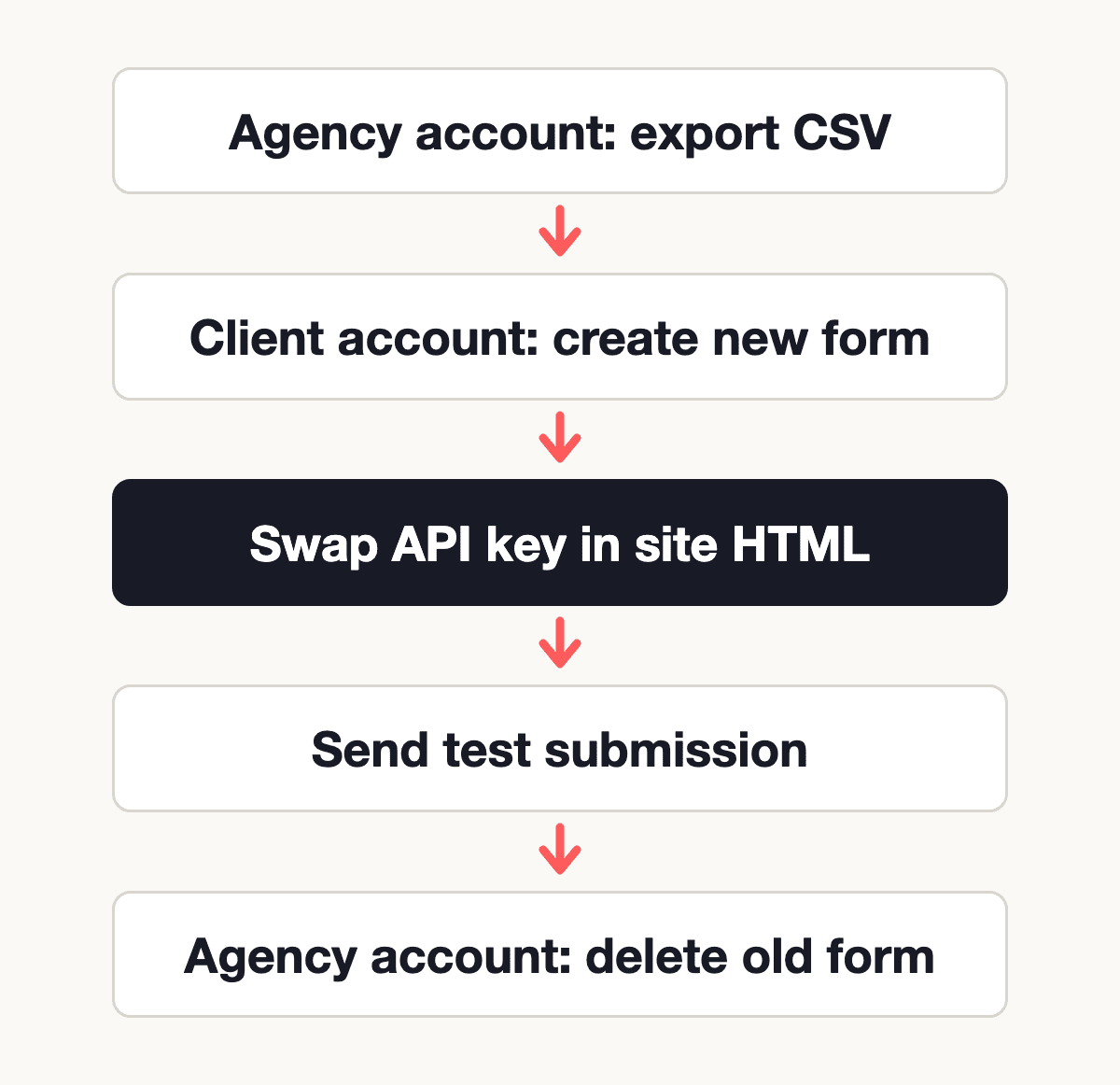
- Export what the client wants to keep. Download the CSV from the form's inbox, and download any attachments you need. We don't offer an import, so the client keeps this file as their archive, and their new inbox starts empty.
- Create the form in the client's account. Free works if they need one form, stay under 250 submissions every 30 days and don't need uploads. Otherwise they need a paid plan. On Pro or Agency they can invite you as an admin, and you can do the rest yourself. On Free or Starter they have no team access, so they create the form and send you the key.
- Rebuild the settings. Copy the Form email, CAPTCHA, domain restriction, rules, integrations and templates from the old form by hand. A CAPTCHA needs its keys entered again.
- Move the sending domain, if you set one up. Remove it from your workspace first, because we refuse a domain that another account has claimed. Your old form falls back to
no-reply@staticforms.devfrom then on. The client then registers the domain in their own workspace and adds the records shown there. Only an owner can do this, so the client does it themselves. - Swap the key and test. Change the
apiKeyvalue in the site's HTML, deploy, and send a test submission. Check that it lands in the client's inbox. - Delete the old form. Deleting it removes the form and its submissions and leaves your other forms alone. Remove any member you invited for that client too.
If a built-in transfer between accounts is a hard requirement, Static Forms doesn't meet it today. Plan for the steps above, or start the client on their own account.
When one account per client is better
An agency workspace isn't always the right structure. Give the client their own account when:
- The client owns the relationship. Legal or procurement wants the data and the contract in the client's name from day one. The client then skips the hand-off above.
- The client needs a different data region. Each account has one region.
- One client gets far more traffic or spam than the rest. Its own account gives it its own quota, its own rate limit and its own abuse block.
- The client uploads a lot of files. Separate storage means their uploads can't evict another client's files.
- You want to bill the cost through directly. The client pays on their own card, and you don't rebill anything.
The trade-off is more logins and more plans. Each account needs its own plan, though Free's one-form limit can fit a small brochure site. On Pro or Agency, the client invites you as an admin, and you switch between workspaces in the sidebar instead of signing in and out. Free and Starter have no team access, so the client makes settings changes or you agree how to share their login.
The native Zapier token is a detail worth checking on this setup. It polls forms you own and doesn't include forms shared with you as a team member, so build client Zaps from the client's own login or use a per-form webhook (Starter and up) instead.
A mix works too. Keep small brochure sites in your workspace, and put the high-traffic client or the EU client on an account of their own.
FAQ
What's a good form backend for agency work?
Look for one login with many forms, recipients and domain limits per form, scoped team access, client branding in email, and a documented way to hand a form over. Static Forms covers the first four, with plan details on the pricing page. Hand-off is a manual process, described above.
Can I give a client access to only their form?
Yes, on Pro and up. Invite them with Specific form access. They use that form's pages and can't open Workspace settings. Pro allows up to 3 invited members, and Agency has no limit.
Can notifications come from my client's domain?
Yes, (Pro and up). Register and verify the domain in your workspace, then attach it to that client's form. You can change the sender address for each form, such as support@client.example. One account at a time can hold a domain.
Can I transfer a form to a client's account?
There is no transfer feature today. Export the CSV, create a new form in the client's account, swap the API key in the site's HTML, then delete the old form.
Do client forms share a submission limit?
Yes. Forms in one account share the monthly quota and the per-minute limit. The hourly limit applies per API key.
Set up your first client form
Create an account and follow the quick start with one real client form. Free lets you test the endpoint and the notification on one form before you buy a plan. When you need a second form, compare plans on the pricing page.
Weighing up vendors too? Our form backend comparison sets eight services side by side.
Related Articles
Static Site Form Services With Spam Protection (2026)
Eight form services compared on honeypots, CAPTCHAs, spam filters, domain limits and rate limits, with the plan each needs. Facts checked 3 November 2026.
Form Backend Services Compared (2026): Free Tiers and Prices
Eight form backends compared on free submissions, paid plans, uploads, CAPTCHAs and data location. Facts from each vendor's own pages, checked 2 November 2026.
10 Best Free Form Processing Services for 2026
Compare the top 10 free form processing service options for static sites. Find the best backend with detailed pros, cons, limits, and code examples.