


Contact Form API: Submit Forms With fetch() and JSON
A contact form API is an HTTP endpoint that accepts a form submission as JSON or form data and sends back a machine-readable result. Your page or server does the POST, and the API handles validation, spam checks, storage and email delivery. You don't run a mail server, and your site can stay fully static.
The request is the easy part. Most guides stop after fetch() and response.ok. The trouble starts later, when you need to show the visitor why a submission failed. A 429 can mean several different things, each with its own retry advice, and a file that is too large never reaches your error handler at all.
This guide uses the Static Forms submit endpoint, https://api.staticforms.dev/submit, because we make it and can show you what the handler actually returns. You'll get:
- a JSON request and a multipart request with a file, as complete scripts;
- the exact success and error bodies, with the status code for each;
- a limits table (monthly quota, per-minute and per-hour rate limits, payload size) for planning high-traffic forms;
- a complete browser example that handles every response.
The response bodies below are the ones the live submit handler returns, checked on 17 November 2026.
What a contact form API does with your request
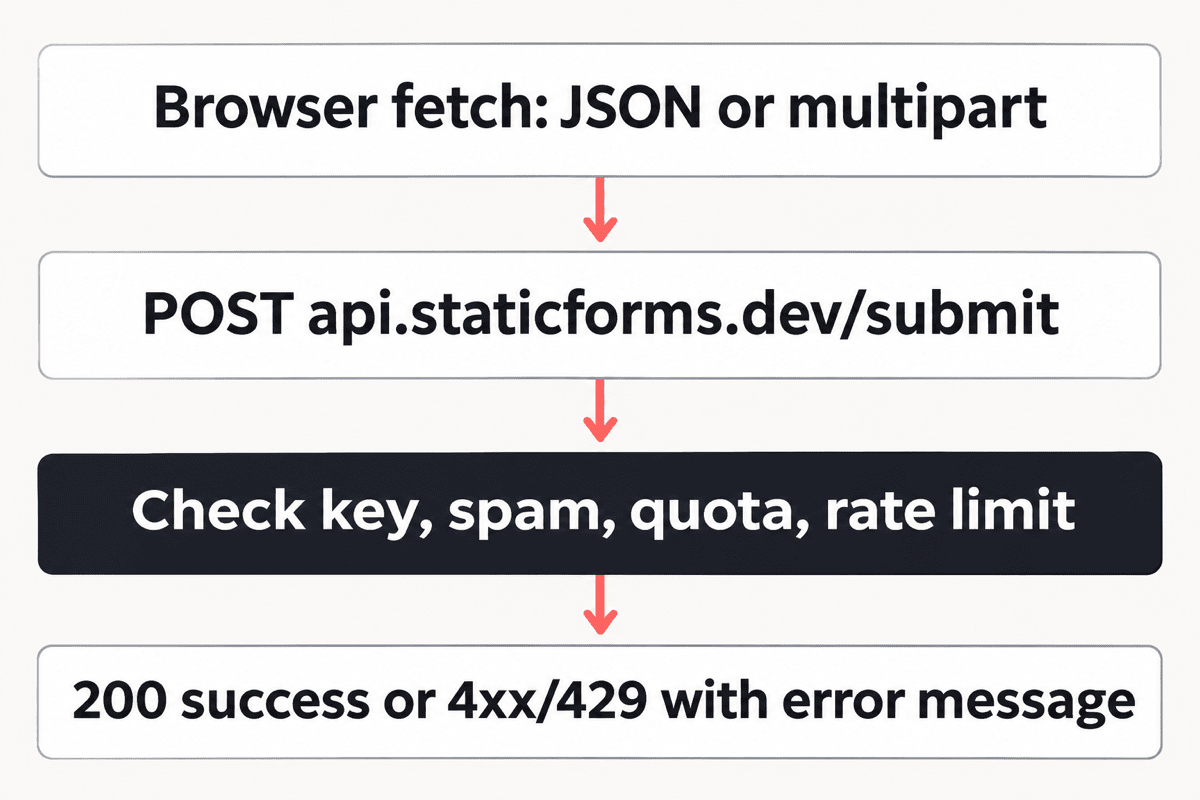
Every submission goes through the same steps, whatever encoding you send:
- Parse. The body is read as JSON, URL-encoded form data or multipart form data, based on
Content-Type. - Authenticate. The
apiKeyfield identifies which form the submission belongs to. - Check. Honeypot fields, CAPTCHA tokens, domain rules, the monthly quota and the rate limits are checked.
- Deliver. The submission is stored and the notification email (and any webhook) goes out.
- Respond. You get a status code and a small JSON body.
The API reference lists every parameter, including the CAPTCHA token fields.
Prerequisites
- A free Static Forms account and the API key from your form in the dashboard.
curl, or Node.js 18 or later (it hasfetch,FormDataandBlobbuilt in).- For the file example, a paid plan. File attachments are a paid feature (Starter and up).
The API key goes into browser-facing code, so anyone can read it in your page source. It identifies a form, and it can't be used to read submissions or change settings. If you want to stop other sites from posting with it, turn on domain restriction (Starter and up).
Step 1: Send a JSON submission
Start from the terminal so you can see the raw response without a browser in the way. Replace YOUR_API_KEY and run:
curl -i -X POST https://api.staticforms.dev/submit \
  -H "Content-Type: application/json" \
  -d '{
    "apiKey": "YOUR_API_KEY",
    "name": "Ada Lovelace",
    "email": "ada@example.com",
    "subject": "API test",
    "message": "Testing the contact form API from curl."
  }'
-i prints the status line and headers. A valid key returns 200 with this body:
{
  "success": true,
  "message": "Form submitted successfully"
}
The body can also carry an id for the stored submission, depending on the form's settings, so don't treat extra keys as an error.
Every field other than the special ones (apiKey, replyTo, redirectTo, honeypot and CAPTCHA fields) appears in the notification email under its own name. The email field is used as the reply-to address unless you send replyTo.
The same request from Node.js, saved as submit-json.mjs and run with node submit-json.mjs:
const response = await fetch('https://api.staticforms.dev/submit', {
  method: 'POST',
  headers: { 'Content-Type': 'application/json' },
  body: JSON.stringify({
    apiKey: process.env.STATIC_FORMS_KEY ?? 'YOUR_API_KEY',
    name: 'Ada Lovelace',
    email: 'ada@example.com',
    message: 'Testing the contact form API from Node.',
  }),
});

const data = await response.json();
console.log(response.status, data);
JSON is the right choice when your data isn't a <form> yet: a chat widget, a multi-step wizard, a server job forwarding leads. It can't carry files, though.
Step 2: Send a file with multipart form data
For attachments, switch to multipart/form-data. Don't set the Content-Type header yourself; fetch adds it with the boundary string when the body is a FormData.
Save as submit-file.mjs, put a small brief.pdf next to it and run node submit-file.mjs:
import { readFile } from 'node:fs/promises';

const form = new FormData();
form.append('apiKey', process.env.STATIC_FORMS_KEY ?? 'YOUR_API_KEY');
form.append('name', 'Ada Lovelace');
form.append('email', 'ada@example.com');
form.append('message', 'Brief attached.');

const pdf = await readFile('./brief.pdf');
form.append('document', new Blob([pdf], { type: 'application/pdf' }), 'brief.pdf');

const response = await fetch('https://api.staticforms.dev/submit', {
  method: 'POST',
  body: form,
});

const data = await response.json();
console.log(response.status, data);
A multipart request from fetch gets the same JSON responses as a JSON request. Plain-text bodies are only returned to a classic HTML form post that the browser itself navigates.
On the Free plan, a request with a file is refused with 400:
{
  "success": false,
  "error": "File uploads require the Starter plan or above. Please upgrade your plan to enable file attachments."
}
The whole request, every file plus every field, must stay under 4.5MB. More on why that limit behaves differently below.
Step 3: Read the error responses
Errors use the same shape: success: false and a human-readable error string. That string is safe to show to the visitor, which saves you from writing a message table for every case.
| Status | Example error |
What to do |
|---|---|---|
400 |
API key is required (provide either apiKey or accessKey) |
Fix the request. Also sent for a body that isn't valid JSON. |
401 |
Invalid API key |
Check the key in your dashboard. Don't retry. |
403 |
Submission rejected: Domain "example.com" is not in the allowed domains list. If you own this form, please add this domain to your allowed domains in settings. |
Domain restriction. A failed CAPTCHA and a paused form (This form is paused and is not accepting submissions...) also answer 403. Fix the cause; don't retry. |
413 |
none (see below) | Request over 4.5MB. Shrink the files. |
422 |
{ "success": false, "errors": [{ "field", "message" }] } |
A form with a builder schema rejected a field. Show each message next to its field. |
429 |
Rate limit exceeded: maximum 10 submissions per minute. Please wait a moment before submitting again. |
Per-minute limit. Wait a minute, then retry once. |
429 |
Rate limit exceeded: maximum 30 submissions per hour for this API key. Please try again later. |
Hourly limit. Retrying within the hour will fail again, so show a "try again later" message. |
429 |
Rate limit exceeded: maximum 50 email deliveries per hour for this API key. Please try again later. |
Hourly email-delivery cap for the key. Retrying within the hour will fail again, so show a "try again later" message. |
429 |
Account temporarily blocked due to sustained rate limit violations. Please try again later or contact support. |
The block lasts an hour. Stop retrying, then try again after it ends. |
429 |
Monthly submission limit (250) exceeded for your account tier (free). Please upgrade your plan to accept more submissions. |
Retrying won't help until the quota resets or you upgrade. |
500 |
Failed to process form submission. Please try again later. |
Retry once after a short wait. |
The numbers inside the 429 messages come from your plan, so read them from the response rather than hard-coding them. If you want the long version of quota versus rate limits, we wrote up quota limits versus rate limits separately.
A
200doesn't always mean an email went out. If the recipient address has bounced before, the submission is stored but delivery is skipped, and the API still answers200. Check the inbox in the dashboard when an email seems to be missing.
The 413 you can't catch in the browser
The 4.5MB limit is enforced by the hosting platform in front of the submit handler, so the handler never sees the request. That has two consequences:
- The 413 body doesn't follow the
{ success, error }shape. - The 413 carries no CORS headers. A cross-origin
fetchfrom your site rejects with aTypeError(a network error) instead of returning a response with status 413.
From browser JavaScript, an oversized upload looks the same as a dropped connection. The only reliable fix is to add up the file sizes before you send. The complete example below does that, with 4MB as the cut-off to leave room for the text fields.
Contact form API limits for high-traffic sites
If you're asking "which forms API holds up under traffic," these are the numbers that matter. They match the API reference and the live API as checked on 17 November 2026. Current prices are on the pricing page.
| Plan | Submissions per period | Per minute (per account) | Per hour (per API key) |
|---|---|---|---|
| Free | 250 | 10 | 30 |
| Starter | 3,000 | 15 | 60 |
| Pro | 25,000 | 20 | 100 |
| Agency | 30,000 | 20 | 100 |
| Pro or Agency trial | 500 | 10 | 30 |
A few details the table can't hold:
- The quota counts submissions, not emails. A submission counts once even if notifications are off.
- Periods. Free resets every 30 days. Monthly paid plans reset with the billing period; annual plans reset every 30 days.
- Past the quota. You get the monthly-limit 429. On Free and Starter, submissions past the quota are refused with that 429 until the period resets or you upgrade. Pro and Agency can opt into overage billing in their account settings so nothing is refused.
- Sustained rate limiting. If your account keeps hitting a rate limit for more than 15 minutes, the account is blocked for an hour. A retry loop with no delay is the easiest way to trigger that.
- Payload size. 4.5MB per request on every plan, files included.
The per-minute limit is shared by every form on your account, and the hourly limit is counted per API key. A spike on one form can use up the per-minute allowance for all of them. Splitting a busy page onto its own form doesn't raise the per-minute limit, but it keeps that form's hourly count separate from the others.
How the browser talks to the API (CORS)
The endpoint answers cross-origin requests from any domain, so you can call it from a page on GitHub Pages, Netlify or your own domain without a proxy.
A JSON Content-Type makes the browser send an OPTIONS preflight first. The endpoint allows POST, OPTIONS and the Content-Type and Authorization request headers, and lets the browser cache that answer for a day, so only the first submission from a visitor pays the extra round trip.
Don't add other custom headers such as X-Requested-With. They aren't on the allowed list, so the preflight fails and the request never leaves the browser. A FormData body with no custom headers skips the preflight entirely.
Complete Working Example
This page sends JSON when there's no file and multipart when there is one. It checks the total file size before sending, shows the API's own error message, disables the button while a request is in flight, and works as a plain HTML form if JavaScript fails to load.
<!doctype html>
<html lang="en">
  <head>
    <meta charset="UTF-8" />
    <meta name="viewport" content="width=device-width, initial-scale=1" />
    <title>Contact us</title>
    <style>
      body { font-family: system-ui, sans-serif; max-width: 36rem; margin: 3rem auto; padding: 0 1rem; color: #1f2937; }
      label { display: block; margin-top: 1rem; font-weight: 600; }
      input, textarea { width: 100%; padding: 0.6rem; margin-top: 0.25rem; border: 1px solid #d1d5db; border-radius: 6px; font: inherit; box-sizing: border-box; }
      button { margin-top: 1.25rem; padding: 0.7rem 1.2rem; border: 0; border-radius: 6px; background: #111827; color: #fff; font: inherit; cursor: pointer; }
      button[disabled] { opacity: 0.6; cursor: wait; }
      .hp { position: absolute; left: -9999px; }
      #status { margin-top: 1rem; min-height: 1.5rem; }
      #status.error { color: #b91c1c; }
      #status.ok { color: #047857; }
    </style>
  </head>
  <body>
    <h1>Contact us</h1>

    <form id="contact" action="https://api.staticforms.dev/submit" method="POST" enctype="multipart/form-data">
      <input type="hidden" name="apiKey" value="YOUR_API_KEY" />
      <input type="hidden" name="redirectTo" value="https://example.com/thanks" />

      <div class="hp" aria-hidden="true">
        <label for="honeypot">Leave this empty</label>
        <input id="honeypot" type="text" name="honeypot" tabindex="-1" autocomplete="off" />
      </div>

      <label for="name">Name</label>
      <input id="name" name="name" type="text" autocomplete="name" required />

      <label for="email">Email</label>
      <input id="email" name="email" type="email" autocomplete="email" required />

      <label for="message">Message</label>
      <textarea id="message" name="message" rows="5" required></textarea>

      <label for="document">Attachment (optional, 4MB total)</label>
      <input id="document" name="document" type="file" />

      <button type="submit" id="send">Send message</button>
      <p id="status" role="status" aria-live="polite"></p>
    </form>

    <script>
      const ENDPOINT = 'https://api.staticforms.dev/submit';
      const MAX_TOTAL_BYTES = 4 * 1024 * 1024; // the endpoint refuses requests over 4.5MB

      const form = document.getElementById('contact');
      const button = document.getElementById('send');
      const status = document.getElementById('status');

      function show(text, kind) {
        status.textContent = text;
        status.className = kind;
      }

      form.addEventListener('submit', async (event) => {
        event.preventDefault();

        const formData = new FormData(form);
        formData.delete('redirectTo'); // only the no-JavaScript fallback should redirect

        const files = formData.getAll('document').filter((f) => f instanceof File && f.size > 0);
        const totalBytes = files.reduce((sum, f) => sum + f.size, 0);
        if (totalBytes > MAX_TOTAL_BYTES) {
          show('Your attachment is larger than 4MB. Please choose a smaller file.', 'error');
          return;
        }

        let request;
        if (files.length > 0) {
          request = { method: 'POST', body: formData };
        } else {
          formData.delete('document');
          request = {
            method: 'POST',
            headers: { 'Content-Type': 'application/json' },
            body: JSON.stringify(Object.fromEntries(formData)),
          };
        }

        button.disabled = true;
        show('Sending...', '');

        try {
          const response = await fetch(ENDPOINT, request);
          const data = await response.json().catch(() => ({}));

          if (response.ok && data.success) {
            form.reset();
            show('Thanks, your message was sent.', 'ok');
            return;
          }

          if (response.status === 422 && Array.isArray(data.errors)) {
            show(data.errors.map((e) => e.message).join(' '), 'error');
          } else if (response.status === 429) {
            show(data.error || 'Too many messages right now. Please try again in a minute.', 'error');
          } else {
            show(data.error || data.message || 'Something went wrong. Please try again.', 'error');
          }
        } catch (error) {
          // Network failure, or a response the browser blocked (an oversized request is one)
          show('We could not reach the form service. Check your connection and try again.', 'error');
        } finally {
          button.disabled = false;
        }
      });
    </script>
  </body>
</html>
What each part is for:
action,methodandenctypeon the form keep a working fallback: without JavaScript, the browser posts the form and followsredirectToto your thank-you page.- The script deletes
redirectTobecause afetchcall shouldn't be redirected; it reads the JSON instead. - The honeypot field is hidden from people and left empty. Any field with
honeypotin its name is treated as a trap and stripped from the email. data.error || data.messageshows the API's own wording first, with a generic line as a fallback.- The
catchblock is where the oversized-upload case lands, which is why the size check runs before the request.
Troubleshooting
401 Invalid API key. Copy the key again from the form in your dashboard. Watch for a stray space or a key from a different form.
400 with "Failed to parse JSON request body". The body isn't valid JSON, or it's JSON but not an object (an array or a bare string). Build it with JSON.stringify() on an object rather than by hand.
The request fails with TypeError: Failed to fetch. Check three things: a custom header that fails the preflight, a request over 4.5MB, or an ad blocker on your own machine. The browser's network tab shows which one it is.
403 on a site that worked yesterday. If domain restriction is on, the page's domain must be on the allowed list. Preview deployments on a new subdomain are a common cause.
Duplicate submissions after a retry. A retry after a network error can send the same message twice if the first request did arrive. Disable the button while a request is in flight, as the example does, and read preventing duplicate form submissions for the other cases.
If you're unsure whether to call the API with fetch at all, how to submit a form with JavaScript compares the native submit, requestSubmit() and the preventDefault() pattern.
FAQ
Is there a free contact form API?
Yes. The Static Forms Free plan accepts 250 submissions every 30 days on one form, over the same API as the paid plans. File attachments (Starter and up) and higher limits need a paid plan; see the pricing page.
Should I send JSON or FormData?
Send JSON when you're building the payload in code and there are no files. Send FormData when you're submitting an existing <form> or attaching files. The responses are the same either way.
Can I call the API from my server instead of the browser?
Yes. The Node examples above work from any server or serverless function, and the responses are the same. From a server, read the key from an environment variable rather than committing it to your repository.
What happens when I hit the rate limit?
You get a 429 whose message names the limit, for example 10 submissions per minute on Free. The advice depends on which one: wait a minute for the per-minute limit, try again later for the hourly submission or email-delivery limits, and don't retry for an hour once the account is blocked. If your account keeps hitting a rate limit for more than 15 minutes, it is blocked for an hour.
Next steps
Create a form, copy its key into the curl command from Step 1, and check that the 200 shows up in your inbox. Then move to the complete example. The API reference has the full parameter list, including the CAPTCHA token fields, when you're ready to add spam protection.
Related Articles
Vue Contact Form Tutorial - Send Email Without a Backend
Learn how to build a working contact form in Vue.js that sends emails without any backend code, using Static Forms.
Contact Form on a Static WordPress Site (Simply Static)
Add a contact form to a static WordPress site that survives a Simply Static or WP2Static export: why plugin forms break, the HTML fix and how to test it.
Why JavaScript Can't Set a File Input's Value (and Fixes)
A file input's value can only be set to an empty string, for security. Clear it, assign files with DataTransfer, or keep your own file list and send FormData.