


Contact Form 7 Alternatives (2026): 6 Options Compared
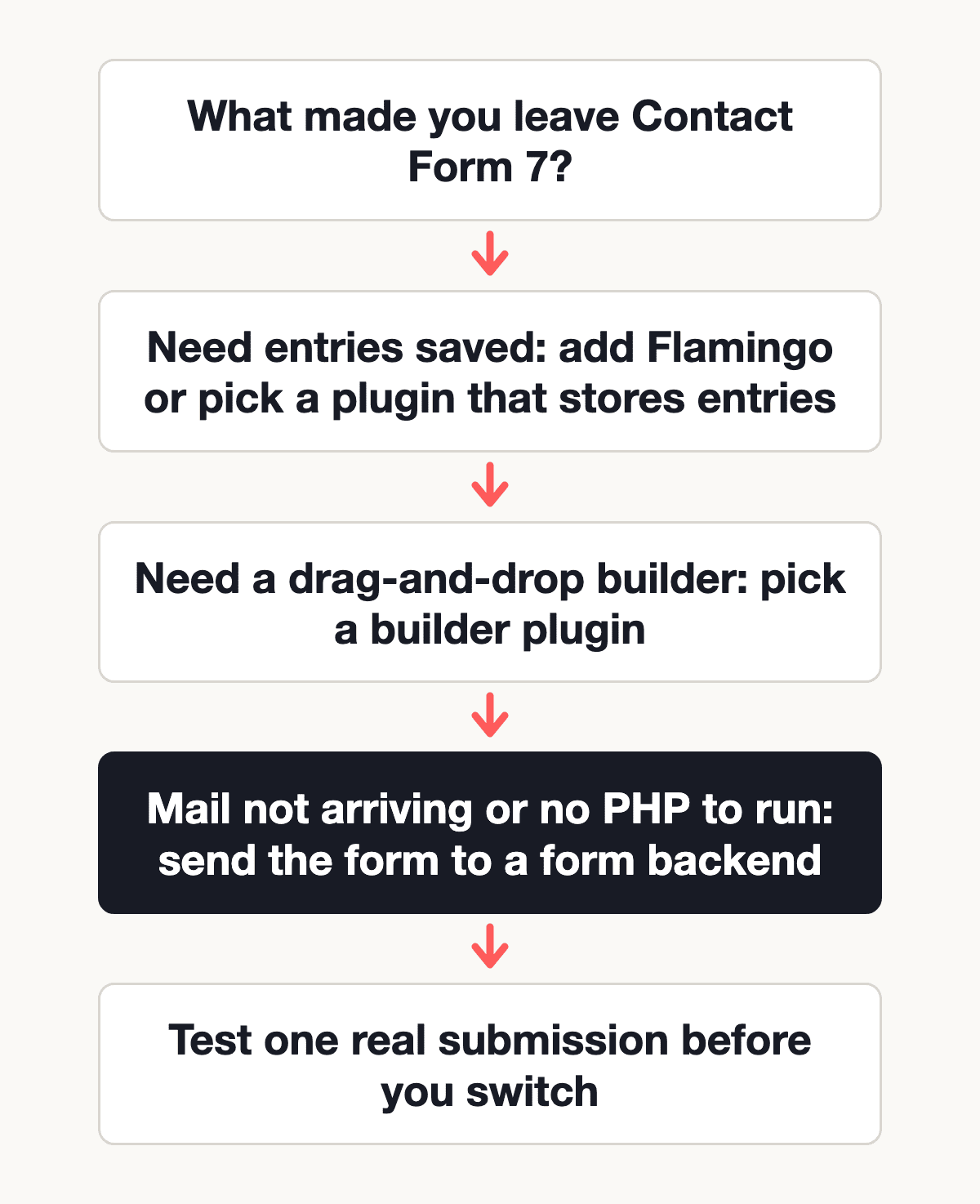
Most people looking for a Contact Form 7 alternative have hit one of three walls: submissions that only exist as emails, emails that never arrive, or an update that broke the form. Which replacement fits depends on which wall you hit. A plugin with an entries screen fixes the first one. The second and third are about where the form runs, and a different plugin may not help.
This post compares five free WordPress form plugins and one option that isn't a plugin at all. Every plugin figure (version, installs, last update, rating, what the free version includes) comes from that plugin's page on wordpress.org, read on 12 November 2026. Plugin pages change with every release, so treat the numbers as a snapshot.
We make Static Forms, the plugin-free option in the list, so read the last row as our take. The rest of the table is what each plugin's own page says.
If you want a general list of WordPress form plugins rather than a switcher's guide, read the best contact form plugins for WordPress.
Why people leave Contact Form 7
Contact Form 7 has the largest install count of any plugin in this post: 10+ million active installations, version 6.2.5, updated 10 November 2026. Lots of sites run it without trouble. The complaints below come from wordpress.org itself, not from vendor reviews.
Submissions aren't saved by default
The Flamingo plugin's wordpress.org page describes it as "a message storage plugin originally created for Contact Form 7, which doesn't store submitted messages." So out of the box, each submission is an email and nothing else. If the email is lost, so is the lead. Flamingo (800,000+ active installations) adds a searchable list in wp-admin, and that is often all a site needs.
Mail that says "sent" but never arrives
Delivery problems are a regular topic on Contact Form 7's wordpress.org support forum. In one thread from early November 2026 ("message sent does not reach its destination"), the form showed its success message while nothing reached the inbox. In another, "Going to spam", from late October 2026, contact form messages ended up in spam, and the replies suggested fixing the SPF record, checking DMARC, setting the From address to the site's own domain and sending through an SMTP plugin.
That last part matters for choosing a replacement. A form plugin that runs inside WordPress usually sends its notifications from the same server, so swapping one plugin for another may not change who sends the mail. Sorting out SPF and DKIM, or adding an SMTP plugin, does.
Updates that break forms
The same forum, on the day we checked, listed threads about a silent submit failure on versions 6.2.2 and 6.2.3 (a JavaScript error, still unresolved, one user rolled back to 6.1.7), a critical error after updating, and Composer and PHP errors. Contact Form 7 6.2.5 now requires WordPress 7.1 and PHP 8.3, so a host on older PHP can't take new releases at all.
A free plugin with millions of installs gets a steady stream of edge cases, and most sites never meet them. Check the forum for your host and PHP version before and after any form plugin update, whichever plugin you pick.
Contact Form 7 alternatives at a glance
All plugin values are from each plugin's wordpress.org page, checked 12 November 2026. "Not stated" means the page doesn't say. It doesn't mean the plugin lacks the feature.
| Option | Active installs | Last updated | File uploads (free version) | Spam tools (free version) | Where entries are stored |
|---|---|---|---|---|---|
| Contact Form 7 (for reference) | 10+ million | 10 Nov 2026 | Not stated on the plugin page | Not stated on the plugin page | Not stored; Flamingo adds storage |
| WPForms Lite | 5+ million | 5 Nov 2026 | Unclear: the page lists a File Upload field but also says Pro "comes with" file uploads | Built-in protection on by default; reCAPTCHA, hCaptcha, Turnstile, custom math or question CAPTCHA | Not stated on the plugin page |
| Fluent Forms | 800,000+ | 2 Nov 2026 | Pro only | reCAPTCHA, hCaptcha, Turnstile | Entries screen with filtering and export |
| Forminator | 600,000+ | 29 Oct 2026 | Multi-file upload field, not marked Pro | reCAPTCHA, hCaptcha, Turnstile, honeypot, Akismet | Stored for sorting and managing; location not stated |
| Ninja Forms | 500,000+ | 9 Nov 2026 | Paid add-on | Honeypot on every form, anti-spam question, reCAPTCHA v2/v3, hCaptcha, Turnstile, Akismet (with the Akismet plugin) | Your WordPress database |
| Formidable Forms | 300,000+ | 16 Oct 2026 | Pro only | Honeypot, Akismet, reCAPTCHA, hCaptcha, Turnstile | Your WordPress database |
| Static Forms | Plugin-free (HTML form) | See docs | (Starter and up), 4.5MB per submission | Honeypot and reCAPTCHA v2 on Free; Turnstile, hCaptcha, ALTCHA and reCAPTCHA v3 (Starter and up) | On Static Forms, outside WordPress |
wordpress.org ratings on the same day: Contact Form 7 4.0 out of 5, WPForms 4.8 (14,394 reviews), Fluent Forms 4.8 (809), Forminator 4.8 (2,151), Ninja Forms 4.4 (1,398) and Formidable Forms 4.8 (1,390). A rating reflects every version the plugin has ever shipped, so read recent reviews before you trust the average.
The five WordPress plugin alternatives
WPForms Lite
WPForms has the second-largest install base in this list (5+ million) and the most reviews. Its page says spam protection is on for every form by default, with reCAPTCHA, hCaptcha and Cloudflare Turnstile set up under WPForms → Settings → CAPTCHA.
The page is unclear about file uploads in the free version. It lists a File Upload field without a Pro label, and in another place says Pro comes with file uploads. If uploads are the reason you're leaving Contact Form 7, install Lite on a staging site and check before you plan around it.
Fluent Forms
Fluent Forms (800,000+ installs) lists reCAPTCHA, hCaptcha and Turnstile in the free version and an entries screen with filtering and CSV, Excel, ODS or JSON export. File and image upload fields are Pro only, and so are multi-step forms, conditional email routing and the advanced styler. If you need uploads on a free plugin, it isn't this one.
Forminator
Forminator (600,000+ installs) is the most generous free option on paper. Its page describes a multi-file upload field with file type, count and size limits and doesn't mark it as Pro. Spam tools include reCAPTCHA, hCaptcha, Turnstile, honeypot fields and Akismet, and the page says it stores submissions so you can sort and manage them. The features it labels Pro only are e-signatures, Stripe subscriptions, PDF generation and geolocation.
Ninja Forms
Ninja Forms (500,000+ installs) stores every submission in your own WordPress database, with no entry limit, according to its page. A honeypot runs on every form automatically, alongside an anti-spam question, reCAPTCHA v2 or v3, hCaptcha and Turnstile. File uploads are a paid add-on, as are conditional logic and multi-step forms.
Formidable Forms
Formidable Forms (300,000+ installs) stores each submission in your WordPress database and includes honeypot, Akismet, reCAPTCHA, hCaptcha and Turnstile in the free plugin. File upload forms, multi-page forms and conditional logic are Pro features. Its last update was 16 October 2026, the oldest in this list but still recent.
The plugin-free option: a form backend
Static Forms works differently from the five plugins above. The form is plain HTML in a Custom HTML block, it posts to https://api.staticforms.dev/submit, and Static Forms handles the notification email, spam checks and stored submissions. WordPress doesn't run any code on submit, so wp_mail(), SMTP plugins and form plugin updates are out of the path.
What the free plan includes (see pricing): 250 submissions every 30 days, one form, honeypot and reCAPTCHA v2. Free submissions are stored for a year, and the inbox shows the last 30 days. File uploads are Starter and up. Webhooks are Starter and up.
There is also an official Static Forms WordPress plugin, downloaded as a ZIP from the WordPress docs rather than installed from wordpress.org. It adds a block and shortcode, and it can forward Contact Form 7 submissions, which leads to a middle path.
Keep Contact Form 7 and fix storage and delivery
If you like your Contact Form 7 forms and only want saved submissions and a second delivery path, you don't have to rebuild anything. The plugin hooks Contact Form 7 and sends a copy of each valid submission to Static Forms, which stores it and sends its own notification. The Contact Form 7 forwarding guide walks through it, including the reply-to rename. One limit: the forwarding sends field values only, not uploaded files.
Complete Working Example
To replace a Contact Form 7 form with a plain HTML form, add a Custom HTML block to the page and paste this. Replace YOUR_API_KEY with the key from your form's General tab in the Static Forms app, and the redirectTo URL with a thank-you page on your site.
<form action="https://api.staticforms.dev/submit" method="POST">
  <input type="hidden" name="apiKey" value="YOUR_API_KEY" />
  <input type="hidden" name="redirectTo" value="https://example.com/thank-you/" />

  <!-- Honeypot: real visitors never see or fill this field -->
  <input type="text" name="honeypot" style="display: none" tabindex="-1" autocomplete="off" />

  <p>
    <label for="name">Name</label><br />
    <input type="text" id="name" name="name" autocomplete="name" required />
  </p>

  <p>
    <label for="email">Email</label><br />
    <input type="email" id="email" name="email" autocomplete="email" required />
  </p>

  <p>
    <label for="message">Message</label><br />
    <textarea id="message" name="message" rows="6" required></textarea>
  </p>

  <p>
    <button type="submit">Send message</button>
  </p>
</form>
The field named email becomes the reply-to address on the notification. For a version without any plugin and more styling, see WordPress forms without a plugin.
Before you remove the old form, send one test message and check that it shows up in the inbox of your form in the app and in your email.
When a WordPress plugin is the better choice
A form backend isn't the right answer for every site. Pick one of the plugins above if:
- You want entries inside wp-admin. Ninja Forms and Formidable Forms store submissions in your WordPress database, and Forminator and Fluent Forms have entries screens. Static Forms keeps submissions on its own servers, so your team checks a separate inbox.
- You build forms visually. All five plugins have a builder in WordPress. With Static Forms you write or paste HTML, or use its form builder outside WordPress.
- You need payments, quizzes or calculations. The wordpress.org pages for Ninja Forms, Forminator, WPForms, Fluent Forms and Formidable Forms all mention payment forms, and Ninja Forms, Forminator and Formidable Forms also mention quizzes and calculators, though some of these features are paid. Static Forms doesn't process payments.
- You need free file uploads. Forminator's page lists a multi-file upload field without a Pro label. Static Forms has file uploads (Starter and up), so Free doesn't include them.
- You expect more than 250 submissions every 30 days and want to pay nothing. None of the five plugin pages mention a submission cap. Static Forms' free plan has one.
Stay on Contact Form 7 if
- Your forms work, the email arrives, and your host runs a PHP version the current release supports.
- The only missing piece is saved submissions. Install Flamingo, or use the forwarding option above, and keep the forms you have.
- You rely on Contact Form 7 add-ons or custom code built around its form tags. Rebuilding those costs more than the problem you're solving.
- Your mail problem is SPF, DKIM or the From address. Fix that first; most plugins send through the same server and will hit the same wall.
Troubleshooting a switch
The new form shows success but nothing arrives
With a plugin, this is usually the same mail delivery problem Contact Form 7 had. Check the plugin's entries screen: if the submission is there, the form works and the email is the problem. With Static Forms, check the form's inbox in the app first, then your spam folder.
Replies go to your own address
The notification needs to know which field holds the visitor's email. In Static Forms that field is named email or replyTo; the API reference lists the special field names. Plugins have a reply-to setting in each form's notification settings.
File uploads disappeared after the switch
Check whether the new plugin's free version has an upload field (see the table). For Contact Form 7 forms with several file fields, the multiple file upload guide covers the options.
FAQ
What is the best free alternative to Contact Form 7?
It depends on why you're leaving. For saved entries and free spam tools, Ninja Forms, Formidable Forms and Forminator all store submissions in the free version. For a form that keeps working when WordPress mail doesn't, a form backend such as Static Forms takes delivery out of WordPress.
Is WPForms better than Contact Form 7?
They solve different problems. WPForms has a drag-and-drop builder and spam protection turned on by default, and its wordpress.org rating is 4.8 against Contact Form 7's 4.0 (12 November 2026). Contact Form 7 has more installs. Neither changes how your server sends email.
Does Contact Form 7 save form submissions?
Not by itself. The Flamingo plugin's wordpress.org page says it was created for Contact Form 7, "which doesn't store submitted messages." Install Flamingo, or forward submissions to a form backend.
Can I use a contact form on WordPress without a plugin?
Yes. Paste an HTML form into a Custom HTML block and point its action at a form backend, as in the example above. The WordPress docs show both the plugin-free form and the optional plugin.
Next steps
If your problem is lost or undelivered submissions, create a free Static Forms account, paste the example form into a Custom HTML block and send one test message. If you'd rather keep Contact Form 7, start with the forwarding guide.
Related Articles
Contact Form 7 Webhook: Send Submissions to Static Forms
Forward Contact Form 7 submissions to Static Forms with the official WordPress plugin: one key, one checkbox, a per-form opt-out and a reply-to fix.
Elementor Form Backend: Send Submissions to Static Forms
Add Static Forms as an Elementor Pro form action: install the plugin, set a key, pick the action and send test entries, with the email field handled for you.
Gravity Forms Webhook to Static Forms: Setup Guide
Send Gravity Forms entries to Static Forms with a Select Fields feed, or post the form HTML directly and hide gform_* and state_ fields. Steps and fixes.