

Turnstile Test Keys, Localhost and Token Errors, Fixed
Turnstile test keys let you run a Cloudflare Turnstile form on localhost, in CI, or on a preview URL without registering a domain or solving a real challenge. They also let you force the failure cases on purpose, which is the only reliable way to see what your form does when a token is missing, expired or rejected.
Below you'll find Cloudflare's test site keys and secret keys, which pairs work together, two ways to test on localhost, and a map from the error text you see (from the widget, from Cloudflare's siteverify API, from Static Forms, or from your own backend) to a cause and a fix.
The Static Forms examples assume a form with Turnstile turned on in its Security tab, which is available on Starter and up. If you haven't added Turnstile to a form yet, start with the Turnstile setup guide and the Cloudflare Turnstile best practices post. This page assumes the widget is already on the page.
Cloudflare Turnstile test keys
Cloudflare publishes dummy keys for testing. Copied from Cloudflare's Turnstile testing docs on October 27, 2026:
| Key type | Value | What it does |
|---|---|---|
| Site key | 1x00000000000000000000AA |
Always passes (visible widget) |
| Site key | 2x00000000000000000000AB |
Always fails (visible widget) |
| Site key | 1x00000000000000000000BB |
Always passes (invisible widget) |
| Site key | 2x00000000000000000000BB |
Always fails (invisible widget) |
| Site key | 3x00000000000000000000FF |
Forces an interactive challenge (visible widget) |
| Secret key | 1x0000000000000000000000000000000AA |
Always passes validation |
| Secret key | 2x0000000000000000000000000000000AA |
Always fails validation |
| Secret key | 3x0000000000000000000000000000000AA |
Returns a "token already spent" error |
A test site key produces the dummy token XXXX.DUMMY.TOKEN.XXXX. Per Cloudflare, the test keys work on any domain, including localhost, 127.0.0.1, 0.0.0.0 and any development domain.
Which test key pairs work together
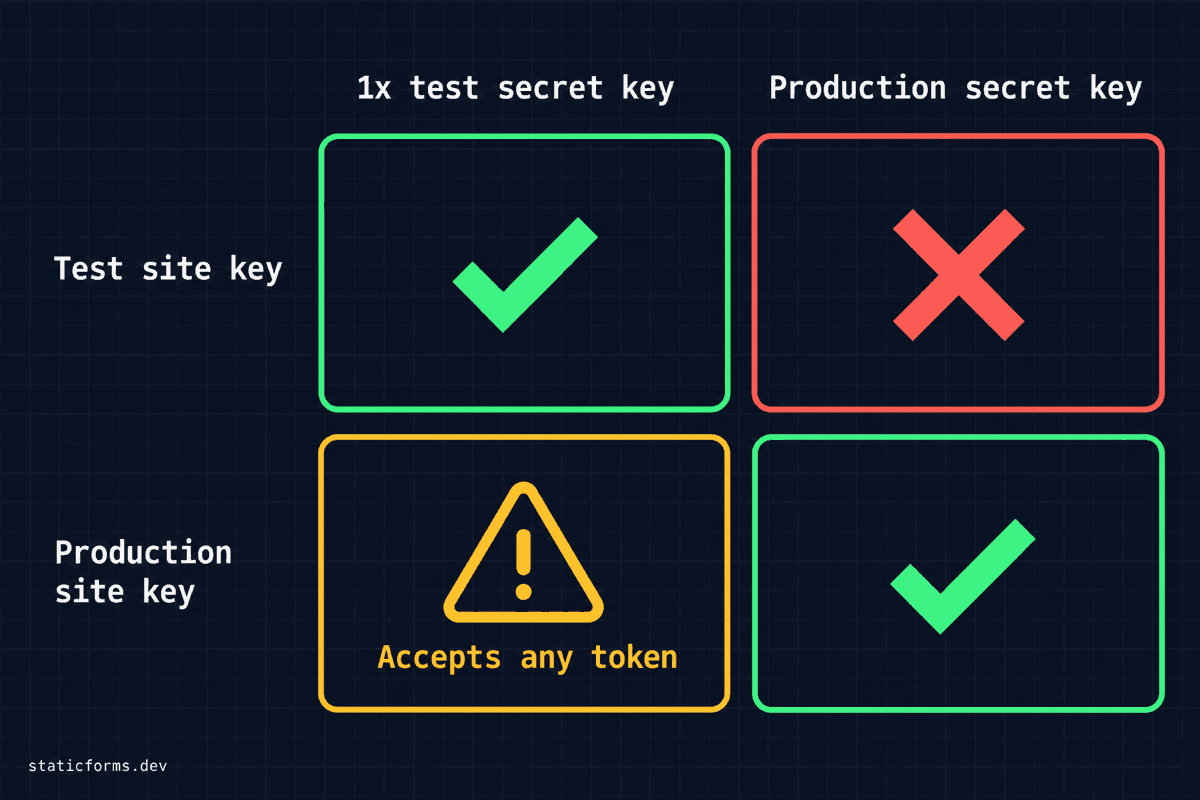
The site key and the secret key live in different places. The site key goes in your page. The secret key goes wherever siteverify runs, which with Static Forms is the form's Security tab.
Here's how the pairs behave:
- Test site key + test secret key. Works. The widget issues the dummy token and the
1x…secret accepts it. The2x…and3x…secrets fail it on purpose. - Test site key + production secret key. Fails. Cloudflare says production secret keys reject the dummy token.
- Production site key +
1x…test secret. Don't rely on this one to fail. Cloudflare's docs say test secrets reject real tokens, but when we called siteverify on October 27, 2026, the1x…AAsecret returnedsuccess: truefor an arbitrary string that wasn't the dummy token. If submissions pass, that doesn't prove your keys match.
So when you swap the site key in your HTML for a test key, swap the secret key too, and keep test secrets on a separate test form. A form with the 1x… secret saved on it accepts any non-empty cf-turnstile-response, so any bot can pass it.
How to test Cloudflare Turnstile on localhost
You have two options, and they test different things.
Option 1: test keys. Put 1x00000000000000000000AA in your page and save 1x0000000000000000000000000000000AA as the Turnstile secret on a test form. Nothing to register, and it works on any port. Then swap the secret to 2x…, 3x… and a made-up string to exercise your failure handling. This tests your integration code, not Cloudflare's risk engine.
Option 2: a separate development widget. Create a second widget in the Cloudflare dashboard, add localhost under Hostname Management, and use its real keys on a test form. This issues real tokens with real expiry, which is what you want when debugging a token that expires on long forms. Cloudflare recommends that production site keys don't allow local domains, so keep localhost off your production widget.
If you skip both and load your production site key on localhost, the widget fails with client error 110200 (Domain not authorized).
Turnstile token errors: lookup table
Find the exact text you're seeing. The tables are split by the layer that produces each message: Static Forms, Cloudflare's siteverify API, the widget in the browser, or your own backend.
Errors from Static Forms
When a form has Turnstile selected and a secret key saved, POST https://api.staticforms.dev/submit returns HTTP 403 with one of these. Requests made with fetch get JSON (success, error, code). A url-encoded HTML form post that asks for text/html gets the error text as the response body, without the code. A multipart/form-data post, which any form with a file input sends, gets the JSON.
error text |
code |
Cause | Fix |
|---|---|---|---|
Turnstile verification failed. Please complete the captcha. |
captcha_required |
No non-empty cf-turnstile-response field reached the API |
Send the token as cf-turnstile-response. Check the request payload in DevTools. |
Turnstile token expired or was already used. Please refresh the captcha and submit again. |
captcha_expired_or_reused |
Cloudflare returned timeout-or-duplicate or invalid-input-response: the token is older than 300 seconds, was already verified, or is malformed. The 2x… and 3x… test secrets also land here. |
Reset the widget and get a new token. Mint tokens at submit time (execute mode), not on page load. |
Turnstile verification failed. Please try again. |
captcha_failed |
Any other failure: a wrong or invalid secret key (invalid-input-secret), or siteverify could not be reached |
Copy the secret from the widget in the Cloudflare dashboard again and save it on the form. |
One more message has no code: HTTP 500 with Turnstile verification failed due to server error. Please try again. Static Forms returns it when an unexpected error stops the check on its side, for example when it can't read the form's stored secret. Nothing in your token or keys causes it, so retry the submission.
Two details from the API code:
- If the same field arrives twice (the widget's own hidden input plus a token you appended to
FormData), Static Forms verifies the last non-empty value. An empty hidden input won't hide your token, but a stale token appended after the fresh one will be the one checked.formData.set()avoids the question. - If the form has no Turnstile secret saved, or CAPTCHA is turned off in its Security tab, Static Forms skips verification and accepts the submission. A test that "passes" may not be checking anything, so save the
2x…secret once and confirm you get a 403 withcaptcha_expired_or_reused.
Errors from Cloudflare's siteverify API
You see these in the error-codes array if you call siteverify yourself, or in your server logs. Descriptions are Cloudflare's, from the server-side validation docs:
| Code | Cloudflare's description | Usual cause |
|---|---|---|
missing-input-response |
Response parameter was not provided | The token never made it into the request |
invalid-input-response |
Token is invalid, malformed, or expired | The token expired, was cut short, or was copied wrong. The 2x… always-fail test secret also returns it. |
timeout-or-duplicate |
Token has already been validated | The same token was verified twice (retries, double submits, or the 3x… test secret) |
invalid-input-secret |
Secret key is invalid or expired | The secret is wrong, for example mistyped or copied only in part |
missing-input-secret |
Secret parameter not provided | Your backend didn't send the secret |
bad-request |
Request is malformed | Check the request format and parameters |
internal-error |
Internal error occurred | Retry the request |
Tokens are valid for 300 seconds, can be validated once, and can be up to 2048 characters long.
Errors from the widget in the browser
These come back through the widget's error-callback, before any token exists. From Cloudflare's client-side error codes:
| Code | Meaning | Fix |
|---|---|---|
110100 |
Invalid sitekey | Check the site key in the Cloudflare dashboard |
110110 |
Sitekey not found | Check its spelling and the widget configuration |
110200 |
Domain not authorized | Add the current hostname under Hostname Management, or use a test site key |
300*, 600* |
Generic challenge failure | Cloudflare treated the visitor as a bot. Retry, then check browser extensions and VPNs, as Cloudflare's challenge troubleshooting page suggests |
"The cf-turnstile-response field is required."
Neither Cloudflare nor Static Forms returns this sentence. It's the shape of a server-side required validation rule; Laravel, for example, prints The <field> field is required. If you see it, your own backend received a request without the field. The usual causes:
- The widget never rendered, so its hidden input was never created.
- A custom
fetchbuilds the body by hand (often JSON) and leaves the token out. - A wrapper library renamed the response field or turned it off.
The fix is the same as for captcha_required: confirm the request payload contains a non-empty cf-turnstile-response.
Complete Working Example
This page uses the always-pass test site key, so it works on localhost with no Cloudflare setup. Save 1x0000000000000000000000000000000AA as the Turnstile secret on a test form in the Static Forms dashboard (Turnstile is available on Starter and up), then replace YOUR_TEST_FORM_API_KEY with that form's API key.
<!DOCTYPE html>
<html lang="en">
<head>
  <meta charset="UTF-8" />
  <meta name="viewport" content="width=device-width, initial-scale=1" />
  <title>Turnstile test form</title>
  <script src="https://challenges.cloudflare.com/turnstile/v0/api.js?render=explicit&onload=onTurnstileLoad" async defer></script>
  <style>
    body { font-family: system-ui, sans-serif; max-width: 32rem; margin: 3rem auto; padding: 0 1rem; }
    label { display: block; margin-top: 1rem; }
    input, textarea { width: 100%; padding: 0.5rem; }
    button { margin-top: 1rem; padding: 0.5rem 1rem; }
    #status { margin-top: 1rem; }
  </style>
</head>
<body>
  <form id="contact-form" action="https://api.staticforms.dev/submit" method="POST">
    <input type="hidden" name="apiKey" value="YOUR_TEST_FORM_API_KEY" />

    <label>Name <input type="text" name="name" required /></label>
    <label>Email <input type="email" name="email" required /></label>
    <label>Message <textarea name="message" rows="4" required></textarea></label>

    <div id="cf-widget"></div>

    <button type="submit" id="submit" disabled>Send</button>
    <p id="status" role="status"></p>
  </form>

  <script>
    // Cloudflare's always-pass test site key. Swap in your real site key for production.
    const SITE_KEY = '1x00000000000000000000AA';

    const form = document.getElementById('contact-form');
    const status = document.getElementById('status');
    const submitButton = document.getElementById('submit');
    let widgetId;
    let pending;

    window.onTurnstileLoad = function () {
      widgetId = turnstile.render('#cf-widget', {
        sitekey: SITE_KEY,
        // Get the token when the form is submitted, so it is seconds old
        // when Static Forms verifies it (tokens expire after 300 seconds).
        execution: 'execute',
        appearance: 'interaction-only',
        callback: function (token) {
          settle(null, token);
        },
        'error-callback': function (code) {
          // Client errors such as 110200 (Domain not authorized) land here.
          settle(new Error('Turnstile widget error ' + code));
        },
        // Without these, an interactive challenge the visitor leaves unfinished
        // would leave the form stuck on "Sending...".
        'timeout-callback': function () {
          settle(new Error('Turnstile challenge timed out'));
        },
        'expired-callback': function () {
          settle(new Error('Turnstile token expired'));
        },
      });
      submitButton.disabled = false;
    };

    // Resolve or reject the token request that is waiting, at most once.
    function settle(error, token) {
      if (!pending) return;
      const waiting = pending;
      pending = null;
      if (error) waiting.reject(error);
      else waiting.resolve(token);
    }

    function getFreshToken() {
      return new Promise(function (resolve, reject) {
        turnstile.reset(widgetId);
        pending = { resolve: resolve, reject: reject };
        turnstile.execute(widgetId);
      });
    }

    async function send() {
      const token = await getFreshToken();
      const formData = new FormData(form);
      // set(), not append(): replaces the widget's hidden input if it exists.
      formData.set('cf-turnstile-response', token);
      const response = await fetch(form.action, {
        method: 'POST',
        headers: { Accept: 'application/json' },
        body: formData,
      });
      // A proxy or platform error page may not be JSON; don't blame Turnstile for it.
      const isJson = (response.headers.get('content-type') || '').includes('application/json');
      const body = isJson ? await response.json() : {};
      return { ok: response.ok, body: body };
    }

    form.addEventListener('submit', async function (event) {
      event.preventDefault();
      submitButton.disabled = true;
      status.textContent = 'Sending...';

      try {
        let result = await send();

        // An expired or already-used token is safe to retry once with a new token.
        if (!result.ok && result.body.code === 'captcha_expired_or_reused') {
          result = await send();
        }

        if (result.ok) {
          status.textContent = 'Thanks, your message was sent.';
          form.reset();
        } else {
          status.textContent = result.body.error || 'Something went wrong. Please try again.';
          console.warn('Static Forms rejected the submission:', result.body);
        }
      } catch (error) {
        status.textContent = 'The spam check could not run. Please reload the page and try again.';
        console.error(error);
      } finally {
        submitButton.disabled = false;
      }
    });
  </script>
</body>
</html>
Serve it from a local server rather than opening the file directly, for example python3 -m http.server 8080 in the file's folder, then open http://localhost:8080.
Then run four test cases by changing only the secret key saved on the test form. Keep the Network tab open:
1x0000000000000000000000000000000AA: the submission goes through and arrives in your inbox.2x0000000000000000000000000000000AA: Cloudflare answersinvalid-input-response, so Static Forms returns 403 withcaptcha_expired_or_reused. The example retries once with a new token, so you see twosubmitrequests, and the page then shows "Turnstile token expired or was already used. Please refresh the captcha and submit again."3x0000000000000000000000000000000AA: Cloudflare answerstimeout-or-duplicate. The result matches case 2: two requests, then the same message.- A made-up secret, such as the
1x…secret with one character changed: Cloudflare answersinvalid-input-secret, so Static Forms returns 403 withcaptcha_failed. The example doesn't retry that code, so you see one request and "Turnstile verification failed. Please try again."
No test secret produces captcha_failed. Case 4 is the one to run if you want to see that message.
Before you go live, put your real site key back in the page and use the form whose Security tab holds the matching real secret.
Troubleshooting checklist
Work through these in order.
- Is verification on? The form needs Turnstile selected and a secret key saved in its Security tab. Without both, Static Forms doesn't check the token.
- Is the token in the request? Open DevTools, find the
submitrequest, and look for a non-emptycf-turnstile-responsein the payload. - Do the keys match? The site key in your page and the secret on the form must come from the same widget, or both be test keys.
- Is the token fresh? Tokens last 300 seconds and verify once. Render with
execution: 'execute'and callturnstile.reset()before every new attempt, including after a failed submit. - Is the hostname allowed? A
110200error means the page's hostname isn't on the widget. Use test keys or a separate development widget forlocalhostand previews.
For general submission debugging (CORS, redirects, status codes), see the debugging guide and the troubleshooting page.
Next step
Set up a test form with the 1x…AA secret, run the example above, then save the 2x… secret and a mistyped secret in turn, so you've seen both failure messages your visitors can get. The Turnstile setup guide has the HTML, React and Next.js versions of the widget code for production.
Related Articles
Cloudflare Turnstile Best Practices
A practical guide to using Cloudflare Turnstile, including rollout advice, common mistakes, and implementation planning tips.
hCaptcha Best Practices
A practical guide to using hCaptcha, including setup decisions, common mistakes, and implementation planning tips.
Contact Form Not Sending Email? Trace the Failure
Find why a contact form is not sending email by tracing the browser request, API response, Static Forms Inbox, delivery status, and mailbox filters.







































