

checkValidity() vs reportValidity(): Check or show errors
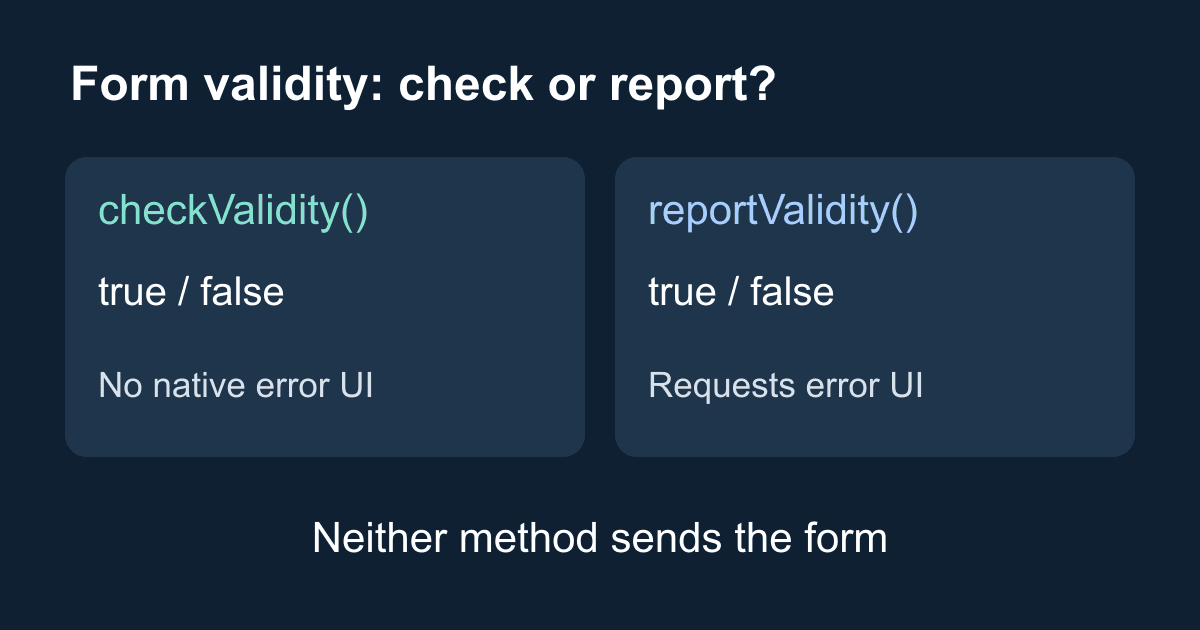
checkValidity() tells your script whether a form passes the browser's validation rules. reportValidity() checks the same rules and asks the browser to show uncanceled validation errors to the user. Neither method sends the form.
That distinction explains a common bug: a developer calls checkValidity(), gets false, and waits for an error bubble that never appears. The check ran. The browser was not asked to show its validation UI.
This guide builds a small, local validation lab with two buttons so you can compare the methods, inspect invalid events, and fix custom errors that refuse to clear. You need a browser and a text editor. The example does not send data or require a Static Forms account.
Which method should you use?
Use checkValidity() when your code needs a boolean result and will decide what happens next. It fires an invalid event on each invalid control, but it does not display the browser's built-in error UI. Event handlers you wrote can still change the page, so this is not a side-effect-free inspection.
Use reportValidity() when the visitor has asked to continue and you want the browser to explain a failed constraint. It also returns a boolean. If an invalid handler cancels the event with preventDefault(), the browser does not report that control's error through its normal UI; the result is still false.
Both methods consider controls eligible for constraint validation, not every node inside a form. A disabled field, for example, is not a candidate. You can inspect a control's willValidate property when a field seems to be ignored.
These behaviors are defined by the HTML constraint validation API and documented for forms in MDN's checkValidity() reference and reportValidity() reference.
Build a two-button validation lab
Save this complete example as validation-lab.html and open it in a browser. There are no placeholders to replace. Use a made-up address such as reader@example.com; this is a browser behavior exercise, not an email delivery test.
<!doctype html>
<html lang="en">
<head>
  <meta charset="utf-8">
  <meta name="viewport" content="width=device-width, initial-scale=1">
  <title>Check or report form validity</title>
  <style>
    body { font: 1rem/1.6 system-ui; margin: 0; color: #172033; }
    main { max-width: 36rem; margin: auto; padding: 1.5rem; }
    label, input { display: block; }
    input, button { font: inherit; padding: .6rem; }
    input { box-sizing: border-box; width: 100%; }
    button { margin: .5rem .5rem .5rem 0; cursor: pointer; }
    :focus-visible { outline: 3px solid #175cd3; outline-offset: 3px; }
    #result { min-height: 3.2em; }
  </style>
</head>
<body>
  <main>
    <h1>Check or report form validity</h1>
    <p>This demo checks an email field. It never sends the form.</p>
    <form id="lab">
      <label for="email">Email (required)</label>
      <input id="email" name="email" type="email" required
        autocomplete="email" aria-describedby="email-help">
      <p id="email-help">Enter an address such as reader@example.com.</p>
      <button id="check" type="button">Check only</button>
      <button id="report" type="button">Show browser error</button>
    </form>
    <p id="result" role="status" aria-live="polite"></p>
    <noscript>This comparison needs JavaScript enabled.</noscript>
  </main>
  <script>
    const form = document.getElementById("lab");
    const result = document.getElementById("result");
    let invalidEvents = 0;

    // invalid does not bubble; listen during the capture phase.
    form.addEventListener("invalid", () => {
      invalidEvents += 1;
    }, true);

    // Block implicit submission (for example, pressing Enter).
    form.addEventListener("submit", (event) => {
      event.preventDefault();
      result.textContent = "Demo only: nothing was sent.";
    });

    function run(method) {
      invalidEvents = 0;
      const valid = form[method]();
      result.textContent =
        `${method} returned ${valid}. ` +
        `Invalid events: ${invalidEvents}. Nothing was sent.`;
    }

    document.getElementById("check").addEventListener("click", () => {
      run("checkValidity");
    });
    document.getElementById("report").addEventListener("click", () => {
      run("reportValidity");
    });
  </script>
</body>
</html>
The two buttons use type="button" deliberately. A submit button would start the normal submission workflow and blur the distinction we are testing. The submit listener prevents navigation when JavaScript is active. If you disable JavaScript, the comparison buttons do nothing; this lab is not a production submission form.
Try these cases:
- Leave the field empty and click Check only. The status should say
falsewith one invalid event. This button does not request a native validation bubble. - Click Show browser error with the field still empty. It should also return
false, but the browser now reports the missing value. The exact wording and presentation vary by browser and language. - Enter
not-an-address. Both methods should returnfalsebecause the email syntax does not pass. - Enter
reader@example.com. Both should returntruewith zero invalid events. This does not prove the mailbox exists or can receive email. - Tab to a button and activate it with the keyboard. Its behavior should match a pointer click, with a visible focus outline.
The status region reports what the script observed. It is separate from the browser's validation UI and does not replace a full accessible error-summary design for a larger form.
Why an invalid listener on the form seems silent
The invalid event is fired on the invalid control and does not bubble up through the form. A listener registered on the form without capture will therefore miss a descendant input's invalid event.
The example passes true as the third argument to addEventListener() to listen during capture. That lets it count the input's event without canceling it. Calling both checking methods in sequence would run validation twice and could trigger your invalid handlers twice. If you need the native UI and the boolean result, use the return value from reportValidity() rather than checking first out of habit.
Reading email.validity.valid is another option when you only want the current field state without dispatching the invalid event. It does not validate every control in the form.
Clear custom validity errors explicitly
A field can contain a syntactically valid address and still fail because application code previously called setCustomValidity() with a nonempty message. Changing the value does not automatically clear that custom error.
With the lab open, run this block in DevTools. It uses a block scope so you can repeat the experiment without redeclaring a console variable:
{
  const field = document.getElementById("email");
  field.value = "reader@example.com";
  field.setCustomValidity("This is a temporary demo error.");
  console.log(field.checkValidity()); // false
  field.setCustomValidity("");
  console.log(field.checkValidity()); // true
}
The empty string clears the custom error; it does not disable required or the email constraint. If the field were empty afterward, it would still be invalid. In a real cross-field rule, recompute the rule when either relevant field changes and set an empty message once that rule is satisfied. MDN's setCustomValidity() documentation describes this requirement.
Validation is separate from submission
You do not need either method just to make a normal required field work. With normal interactive validation enabled, the browser checks constraints before dispatching a successful submission's submit event. An invalid form can stop before your submit listener ever runs.
novalidate on the form, or formnovalidate on the submitter, bypasses that automatic submission-time check. Those attributes do not make explicit calls to checkValidity() or reportValidity() disappear. Direct form.submit() also bypasses constraint validation and the submit event. For the difference between requesting a normal submission and bypassing it, read requestSubmit() vs submit().
If you already have a contact form connected to Static Forms, keep its action, fields, and submission code intact while investigating validation. Do not copy the lab's submission blocker into a working form: it intentionally prevents delivery. Use the getting started guide for the actual sending path.
Debug the result before changing the form
False, but no visible error: check which method you called. With reportValidity(), also look for an invalid handler that calls preventDefault(), or an invalid control that cannot be focused because it is hidden.
True, but a field is empty: confirm that the field has required, belongs to the expected form, and has willValidate === true. A field with no applicable failing constraint can legitimately pass.
False after the user fixed the value: inspect validity.customError and the code that last called setCustomValidity(). Clear the message when the custom rule passes, not merely when the field becomes nonempty.
A programmatically filled field behaves differently: some constraints depend on user editing. In particular, do not use a JavaScript assignment alone to test minlength or maxlength; MDN's constraint validation guide documents this distinction. Our email example tests missing values and syntax instead.
Test the deployed page separately
You can host the lab as a static HTML file without a build step. If your site's Content Security Policy blocks inline scripts or styles, move them into allowed same-origin files and load those files through your site's normal policy. Do not weaken the policy just to run a demonstration.
On your actual contact page, test empty fields, malformed input, correction after an error, keyboard submission, and the server's response. A successful browser validation result is not a successful HTTP request, saved submission, or delivered email. Keep the visitor's values when the server rejects a request so they can correct it without retyping everything.
Browser constraints are also not a security control. Requests can bypass the page entirely. Validate required business rules on the receiving server and configure appropriate spam protection for your submission flow. Do not assume a hosted endpoint learns custom business rules from the HTML in your page.
For this lab, the success condition is smaller and observable: each method returns the expected boolean, invalid events are counted, only the reporting button requests native error UI, and no data is sent. Once those behaviors are clear, choose the method that matches the feedback your visitor needs.
Related Articles
Contact Form Success Message Examples That Help Users
Write clearer contact form success messages with practical examples, accessible live-region markup, honest response states, and a tested HTML pattern.
Make a Claude-Generated Website Contact Form Send Email
Fix a Claude-generated website contact form that fakes success. Trace the handler, patch HTML or React, protect secrets, and test the published Artifact.
Add Email to a Replit Website Contact Form
Connect a Replit website contact form to email with plain HTML and React examples, safe key handling, publishing checks, spam controls, and fixes.







































