

requestSubmit() vs submit(): Validate Forms Before Sending
A form can look valid in the browser and still send the wrong request if your JavaScript uses the wrong submission method. The two similar-looking calls, form.requestSubmit() and form.submit(), do different jobs.
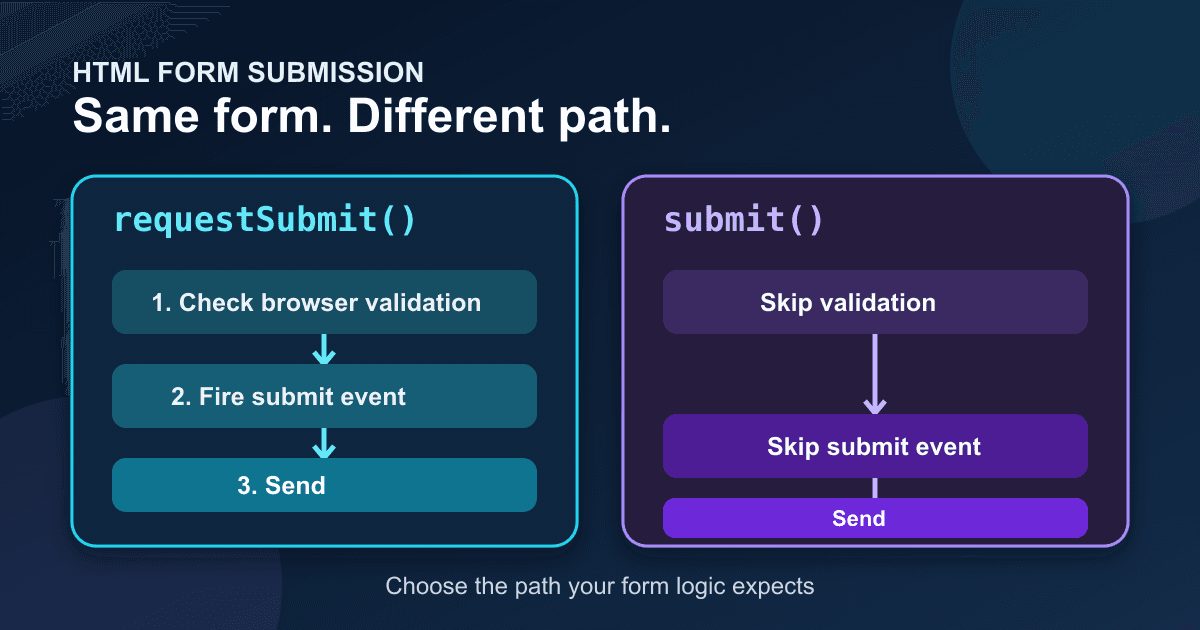
requestSubmit() behaves like a real click on a submit button. It runs constraint validation, fires the submit event, and includes the chosen button's name and value. submit() skips those steps and sends the form directly.[1][2]
That difference matters when a contact form depends on required fields, a shared submit handler, or the button that says what the visitor intended to do.
The short answer
Use requestSubmit() when code needs to submit a form through its normal browser workflow:
const form = document.querySelector('#contact-form');
form.requestSubmit();
Use submit() only when you deliberately want to bypass validation and the form's submit event. That is unusual in application code.
Calling form.submit() is not the JavaScript equivalent of clicking the form's submit button. Calling form.requestSubmit() is much closer.
What each method runs
A normal button click follows this sequence:
- The browser checks built-in constraints such as
required,type="email",minlength, andpattern. - If the form is valid, the browser fires the
submitevent. - The event handler can read the selected submitter, prevent navigation, and send the data with
fetch(). - If no handler cancels the event, the browser submits to the form's
action.
requestSubmit() enters that sequence at the start. The HTML Standard defines it as a request to submit the form, using an optional submit button as the submitter.[3]
submit() jumps to the last step. MDN notes that it does not raise the submit event and does not trigger constraint validation.[2] Any logic attached with addEventListener('submit', ...) will not run.
A tested contact form pattern
The example below has one submission path. A user can click Send message, press Enter in a field, or activate the separate Send from shortcut button. Every valid attempt reaches the same submit handler.
<form id="contact-form" action="https://api.staticforms.dev/submit" method="post">
  <input type="hidden" name="apiKey" value="YOUR_API_KEY">

  <label for="contact-email">Email</label>
  <input
    id="contact-email"
    name="email"
    type="email"
    autocomplete="email"
    required
  >

  <label for="contact-message">Message</label>
  <textarea
    id="contact-message"
    name="message"
    minlength="10"
    required
  ></textarea>

  <button id="send-message" type="submit" name="intent" value="contact">
    Send message
  </button>
  <button id="send-shortcut" type="button">Send from shortcut</button>
  <p id="contact-status" role="status" aria-live="polite"></p>
</form>

<script>
  const form = document.querySelector('#contact-form');
  const submitButton = document.querySelector('#send-message');
  const shortcutButton = document.querySelector('#send-shortcut');
  const status = document.querySelector('#contact-status');

  shortcutButton.addEventListener('click', () => {
    form.requestSubmit(submitButton);
  });

  form.addEventListener('submit', async (event) => {
    event.preventDefault();

    const activeButton = event.submitter;
    activeButton.disabled = true;
    status.textContent = 'Sending...';

    try {
      const response = await fetch(form.action, {
        method: 'POST',
        body: new FormData(form, activeButton),
        headers: { Accept: 'application/json' },
      });
      const result = await response.json().catch(() => ({}));

      if (!response.ok) {
        throw new Error(result.error || result.message || `Request failed (${response.status})`);
      }

      form.reset();
      status.textContent = 'Message received.';
    } catch (error) {
      status.textContent = error instanceof Error
        ? error.message
        : 'The message could not be sent.';
    } finally {
      activeButton.disabled = false;
    }
  });
</script>
Replace YOUR_API_KEY with the public form key shown in Static Forms. The current API reference documents POST https://api.staticforms.dev/submit, with the key supplied as apiKey, and includes a Fetch plus FormData example.[4]
The code does not set Content-Type. When FormData is the request body, the browser creates the multipart boundary and the matching header. Setting a bare multipart/form-data header yourself can leave the request without the boundary its parser needs.[5]
Why pass the submit button
requestSubmit() accepts an optional submit button. Passing it does more than imitate a click.
The browser treats that button as the submitter. Its name and value join the submitted data, so the example sends intent=contact. Button-level attributes such as formaction and formmethod can also override the form's defaults.[1][3]
This is useful when one form has actions such as Save draft and Send now. Your handler can inspect event.submitter, and the server receives the selected button's value.
Keep the button connected to the same form. requestSubmit() throws if the supplied element is not a submit button or does not belong to that form.[1]
Validation happens before the submit event
This ordering trips people up. If requestSubmit() finds an invalid required field, the browser reports the problem and stops. The submit handler never runs.
That is usually what you want. Do not set a loading message before calling requestSubmit(), because an invalid form would leave the page claiming that it is sending. Put loading state inside the submit handler, as the example does.
You also do not need to call reportValidity() first. requestSubmit() already runs interactive constraint validation. MDN's constraint-validation guide lists submitting through a submit button as an interactive validation trigger and distinguishes it from calling submit().[6]
Client-side validation improves feedback, but it is not a security boundary. Requests can be created without your page, and values can be changed. Validate required fields, lengths, formats, file types, and permissions again at the receiving endpoint.[6]
The `name="submit"` trap
Form controls become named properties on their form. A control named submit can hide the method:
<form id="broken-form">
  <input name="submit" value="Send">
</form>
After that markup, form.submit refers to the input instead of the function. Calling it can fail with an error such as form.submit is not a function.[2]
Avoid name="submit" and id="submit". Choose a field name that describes the value, such as intent, action, or topic.
Common failure symptoms
The required fields are ignored
Your code probably calls form.submit(). Replace it with form.requestSubmit() and keep validation attributes on the controls.
The submit handler never runs
form.submit() does not dispatch the submit event. Use requestSubmit(), click a real submit button, or move the shared work into a function that both paths call deliberately.
Pressing Enter works, but the custom button does not
Check the custom button's type. A button outside the form's normal submit flow should use type="button", then call requestSubmit() on the intended form. If the button sits outside the <form>, it can also target the form with form="contact-form" and use type="submit" without JavaScript.
The wrong action or intent reaches the server
Pass the intended submit button to requestSubmit(button). Then inspect event.submitter in the handler and confirm the button's name=value pair in DevTools under Network.
`form.submit is not a function`
Search the form for a control named or identified as submit. Rename that control.
Check the behavior in DevTools
Test one invalid attempt and one valid attempt:
- Leave the email empty and activate the shortcut. The browser should focus the invalid email field. No request should appear in Network.
- Enter a valid email but fewer than 10 message characters. The message field should block submission.
- Complete both fields and activate the shortcut. Network should show one POST request.
- Inspect the request payload. It should contain
apiKey,email,message, andintent=contact. - Inspect the response before showing success. A page should not tell the visitor that a message was received merely because
fetch()resolved; HTTP error responses also resolve. - Repeat the valid test with the keyboard. Focus the submit button and press Enter or Space.
If you are also guarding against double clicks, keep the protection inside the shared submit handler. The duplicate-submission guide covers retries and server-side idempotency. For broader native constraints, see the HTML validation guide.
Ship one submission path
Programmatic submission is safest when it rejoins the browser's normal form flow. Use requestSubmit() for shortcuts, modal confirmations, and other code-driven triggers. Keep validation and network state in the submit handler, read event.submitter when the chosen action matters, and reserve submit() for the rare case where bypassing all of that is intentional.
Sources
- MDN:
HTMLFormElement.requestSubmit()(page last modified 23 June 2025; checked 15 September 2026) - MDN:
HTMLFormElement.submit()(page last modified 10 April 2025; checked 15 September 2026) - WHATWG HTML Standard:
requestSubmit()(living standard checked 15 September 2026) - Static Forms API reference (checked live 15 September 2026; no visible update date)
- MDN: Using FormData objects (page last modified 24 June 2025)
- MDN: Constraint validation (page last modified 25 November 2025; checked 15 September 2026)
Related Articles
Multiple submit buttons: keep the chosen value in FormData
Keep the clicked submit button's value with event.submitter and FormData. Try a complete browser demo and fix values lost when buttons are disabled too soon.
HTML email multiple: validate a comma-separated list
Validate multiple email addresses in one HTML input. Test commas, invalid lists, a count limit, and the exact FormData value with a complete local demo.
HTML date inputs: min, max, step, and timezone mistakes
Build an HTML date input with min, max, and step. Validate a weekly date range, preserve date-only values, and avoid off-by-one timezone mistakes.







































