

How to Debug a Failed Static Forms Webhook From the Delivery Log
A failed webhook is easier to diagnose when you stop treating it as one black box. Find the last boundary that definitely worked, then inspect the next one with a single submission ID and UTC timestamp.
Trace these boundaries in order: the browser submission, the saved Static Forms submission, the outgoing delivery attempt, the receiver, any queue or worker, and the final destination.
This runbook is for an existing integration that has stopped working or behaves differently in production. It does not repeat webhook setup, authentication code, or retry architecture. Those have their own guides.
Start with one failed delivery
Pick one real failure. Do not start by scanning a day of mixed requests or firing ten more test submissions. You need one event you can follow without confusing it with retries.
Record these details:
- the submission ID
- the submission time in UTC
- the configured endpoint, with query secrets removed
- the HTTP status and response shown in the delivery log
- the attempt number and duration
- the matching receiver log, if one exists
Avoid pasting the full payload into a ticket. Contact forms often contain names, email addresses, phone numbers, and free-text messages. A header dump may also contain an Authorization value. Keep the evidence small and redact it before sharing.
Open your form's Delivery settings and inspect the attempt rather than guessing from the missing CRM row. Static Forms webhook delivery documentation covers configuration and test delivery, while the webhooks integration page describes the delivery logs and response details available for each attempt.
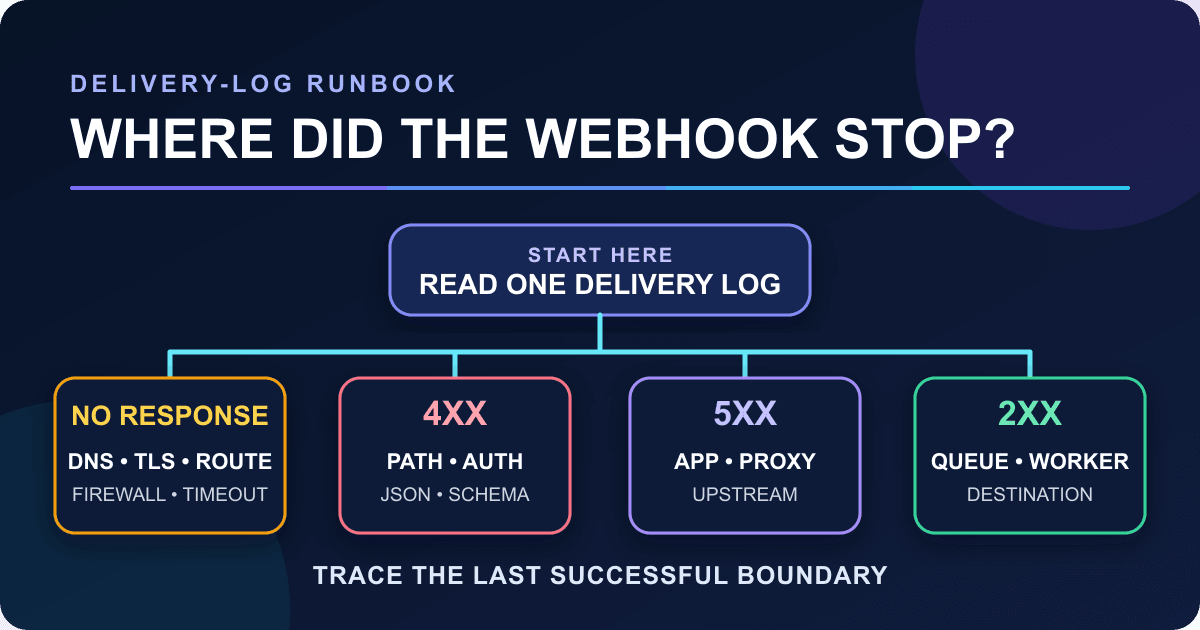
Find the last successful boundary
The place where evidence stops tells you which system to inspect next.
| Evidence | What it establishes | Next check |
|---|---|---|
| No submission appears in Static Forms | The browser-to-form path failed, or the submission was filtered before the expected view | Inspect the browser request and the form's inbox or spam view |
| Submission exists, but there is no outgoing attempt | Delivery may be disabled, the wrong form may be selected, or the event may not be configured | Reopen the webhook settings and run one test delivery |
| Attempt has no HTTP response | Static Forms could not complete an HTTP exchange | Check DNS, TLS, routing, firewall rules, and receiver latency |
| Attempt has a 4xx response | The receiver rejected the request | Use the exact code and response body to inspect method, path, media type, authentication, or schema |
| Attempt has a 5xx response | The receiver or one of its upstream dependencies failed | Match the UTC time and submission ID in receiver and platform logs |
| Attempt has a 2xx response, but the final action is missing | The HTTP receiver accepted the request | Inspect work performed after the response: queues, workers, database writes, and destination APIs |
A 2xx status establishes successful receipt, understanding, and acceptance at the HTTP layer; it does not establish downstream completion. A 202 Accepted explicitly says processing is incomplete, and a 204 No Content cannot prove that a later queue consumer created the lead.
Use the delivery log's status and response
Start with the exact status and response excerpt recorded for the failed Static Forms attempt. The code narrows the search, but the response body and receiver logs usually identify the cause.
400 Bad Request points to something the server considers a client error. Check the response body, JSON syntax, and required fields. Do not assume every 400 means malformed JSON; applications use it for other validation failures too.
401 Unauthorized means the request lacks valid authentication credentials; they may be missing or invalid. A conforming 401 response includes a WWW-Authenticate challenge. 403 Forbidden means the server understood the request but refuses it. If either appears, compare the configured auth mode with the receiver and proxy configuration. The dedicated webhook authentication guide covers header formats, token comparison, and rotation without turning this incident into an auth rewrite.
404 Not Found often means the deployed path differs from the configured path, but it can also be returned deliberately to hide a resource. 405 Method Not Allowed means the target resource does not support POST. A conforming response includes an Allow header listing the supported methods. Check the production deployment rather than a local route with the same name.
415 Unsupported Media Type tells you to inspect Content-Type and the framework's body parser. Static Forms sends JSON. 422 Unprocessable Content usually means the receiver understood the media type and syntax but rejected the payload's instructions or shape.
429 Too Many Requests is a rate-limit response. RFC 6585 says it may include Retry-After; it does not define one universal quota or counting rule. Check the response body and the receiver's own rate-limit logs.
425 Too Early means the server was unwilling to process a request that might be replayed. Inspect the TLS or proxy path before manually replaying the event.
A 500 is an unexpected server condition. 502 and 504 point toward a gateway or upstream failure, not necessarily the first line of your webhook handler. A 503 can describe overload or maintenance and may include Retry-After. The HTTP status definitions in RFC 9110 are useful when a platform's label is vague.
Run one controlled test delivery
Use Static Forms' test action first. It sends the documented test event to the URL and headers configured for the form without requiring a visitor to submit the public form. Use the webhook payload preview to compare the documented headers and JSON envelope with your receiver's contract. To inspect an actual request, send a test to a temporary receiver you control; do not redirect an active production form.
A second probe with curl separates receiver behavior from the Static Forms configuration. Create a minimal synthetic payload with the same envelope and field types as the failed delivery, save it as sample-webhook.json, then run:
curl --fail-with-body \
  --include \
  --verbose \
  --max-time 5 \
  --json @sample-webhook.json \
  https://hooks.example.net/webhooks/staticforms \
  --write-out '\nstatus=%{http_code} connect=%{time_connect}s total=%{time_total}s\n'
The curl man page documents each option. --json sets JSON request headers, but curl does not validate the file's JSON. --fail-with-body keeps an error response body while returning a failing exit code for HTTP errors. --max-time limits the whole transfer, while time_connect helps separate connection setup from later work. The five-second limit is only a ceiling for this probe; it does not establish the timeout used by Static Forms.
Be careful with --verbose. It prints request and response headers, which can expose credentials. Run it in a controlled shell, remove Authorization values before sharing the output, and do not paste a real contact-form payload into a public issue.
Compare the curl result with the Static Forms attempt:
- Both fail the same way: investigate the receiver or its infrastructure.
- curl succeeds but the Static Forms attempt is rejected: compare the exact method, path, headers, JSON envelope, source restrictions, and production allowlists.
- Both Static Forms and curl receive 2xx, but the lead is still missing: stop probing the public endpoint and inspect the receiver's queue, worker, database, and destination logs.
Do not add curl --retry blindly to a POST while debugging. RFC 9110's idempotency rules warn against automatically retrying a non-idempotent method unless you know it is safe. A timed-out request may already have changed state. Use the retry and idempotency guide before replaying production events.
Use a receiver that records minimal diagnostic evidence
When framework middleware, proxies, or serverless logs hide too much, this small Node.js receiver isolates the HTTP boundary. It logs the method, normalized pathname, content type, event name, submission ID, and the presence of authentication and idempotency headers. It does not record credential values or formData.
import { createServer } from "node:http";

const MAX_BODY_BYTES = 1024 * 1024;

function send(response, status, body = "") {
  response.writeHead(status, {
    "content-type": "application/json; charset=utf-8",
    "cache-control": "no-store",
  });
  response.end(body ? JSON.stringify(body) : undefined);
}

export function createDiagnosticServer({ log = console.log } = {}) {
  return createServer((request, response) => {
    if (request.method !== "POST") {
      response.setHeader("allow", "POST");
      send(response, 405, { error: "Use POST" });
      return;
    }

    const requestUrl = new URL(request.url ?? "/", "http://localhost");

    if (requestUrl.pathname !== "/webhooks/staticforms") {
      send(response, 404, { error: "Wrong webhook path" });
      return;
    }

    const contentType = request.headers["content-type"] ?? "";
    if (!contentType.toLowerCase().startsWith("application/json")) {
      send(response, 415, { error: "Expected application/json" });
      return;
    }

    const chunks = [];
    let size = 0;
    let tooLarge = false;

    request.on("data", (chunk) => {
      size += chunk.length;
      if (size > MAX_BODY_BYTES) {
        tooLarge = true;
        return;
      }
      chunks.push(chunk);
    });

    request.on("end", () => {
      if (tooLarge) {
        send(response, 413, { error: "Request body exceeds 1 MiB" });
        return;
      }

      const body = Buffer.concat(chunks).toString("utf8");
      let payload;
      try {
        payload = JSON.parse(body);
      } catch {
        send(response, 400, { error: "Invalid JSON" });
        return;
      }

      if (
        typeof payload?.event !== "string" ||
        typeof payload?.data !== "object" ||
        payload.data === null ||
        Array.isArray(payload.data)
      ) {
        send(response, 422, { error: "Expected event and object data" });
        return;
      }

      log({
        method: request.method,
        path: requestUrl.pathname,
        contentType,
        userAgent: request.headers["user-agent"] ?? null,
        hasAuthorization: Boolean(request.headers.authorization),
        hasIdempotencyKey: Boolean(request.headers["idempotency-key"]),
        event: payload.event,
        submissionId: payload.data?.submissionId ?? null,
        topLevelKeys: Object.keys(payload),
      });

      send(response, 204);
    });
  });
}

if (process.argv[1] === new URL(import.meta.url).pathname) {
  const server = createDiagnosticServer();
  server.requestTimeout = 5_000;
  server.listen(8787, "127.0.0.1", () => {
    console.log("Diagnostic receiver: http://127.0.0.1:8787/webhooks/staticforms");
  });
}
Run it with a current Node.js release:
node diagnostic-receiver.mjsUse http://127.0.0.1:8787/webhooks/staticforms for local curl probes. A hosted Static Forms test delivery cannot reach your loopback address directly. If you must send a Static Forms test to this receiver, expose it through a temporary authenticated HTTPS tunnel or deploy it behind HTTPS in a controlled environment. Put authentication or an IP allowlist at the edge, and remove the endpoint when the incident is over.
The receiver returns distinct codes for wrong method, wrong path, wrong content type, invalid JSON, and a missing envelope. That makes the evidence useful without pretending it is a production handler. It does not authenticate requests, persist events, run business logic, or protect against replay. Keep those controls in the real receiver.
Node's HTTP API documentation documents the method, url, and normalized headers properties used above. Collect only the fields needed to correlate the failed delivery.
Treat no response differently from a bad response
An HTTP error response means an application or intermediary answered. "No response" means the exchange did not finish, so the search area is different.
Check these in order:
- Resolve the production hostname from outside your private network.
- Confirm the TLS certificate covers that hostname and includes a valid chain.
- Confirm the configured path reaches the deployed POST route.
- Inspect CDN, web application firewall, reverse proxy, and IP allowlist events.
- Match the request time in the receiver's access logs.
- If the request arrived, measure how long the handler waited on databases or external APIs before replying.
A timeout identifies neither the slow step nor whether the receiver changed state. The receiver may have committed data before its response was lost. Preserve the submission ID and idempotency key while investigating, and avoid manual replay until duplicate side effects are controlled.
Build an escalation packet someone can use
If the failure survives the checks above, hand the next person a compact packet instead of "webhooks are broken." Include:
- submission ID and UTC timestamp
- endpoint host and path, with secrets removed
- Static Forms attempt number, duration, status, and response excerpt
- whether a test delivery reproduces it
- whether the webhook tester receives the expected envelope
- the scrubbed curl command and its status/timing output
- the matching receiver, proxy, or platform request ID
- the first boundary with no evidence
State what you did not test. If you could not inspect the queue, say so. If a firewall log is unavailable, leave that branch open. Order the evidence by UTC timestamp and include the submission ID or request ID on every item. Screenshots without either are difficult to correlate.
Fix the cause without destroying evidence
Make the smallest change that explains the observed result. Correct a route, content type, header mapping, timeout, or worker failure one at a time, then repeat the same controlled test.
Keep the original failure record until the fix is verified. Replacing the endpoint, rotating credentials, increasing timeouts, and replaying old events all at once may make the next attempt succeed, but you will not know which change mattered. It can also duplicate work.
For n8n-specific receiver and workflow checks, use the Static Forms to n8n guide. For background on delivery terminology, read how webhooks work. Once one test event can be traced through every boundary, restore the production destination and verify one fresh submission from the public form.
Related Articles
Webhook Retries Without Duplicate Leads: An Idempotency Guide
Stop webhook retries from creating duplicate leads with stable event IDs, atomic DynamoDB receipts, safe CRM upserts, and tested Node.js code.
Bearer vs Basic vs Custom Header Auth for Form Webhooks
Choose Bearer, Basic, or a custom header for form webhooks. See exact request formats, safe Node.js validation, token rotation, and 401/403 fixes.
HTML form enctype: URL encoding, multipart, and file uploads
Choose the right HTML form enctype, inspect URL-encoded and multipart bodies in a local demo, and fix file uploads without breaking Content-Type boundaries.







































