

Send Form Submissions to n8n With a Reliable Webhook
The easiest n8n mistake happens before the workflow does anything useful: copying the Test URL into a production integration. It works while n8n is listening for a test event, then stops.
Use the Production URL for the live connection. Keep the Test URL for setup, where seeing one real payload is worth more than guessing at field paths.
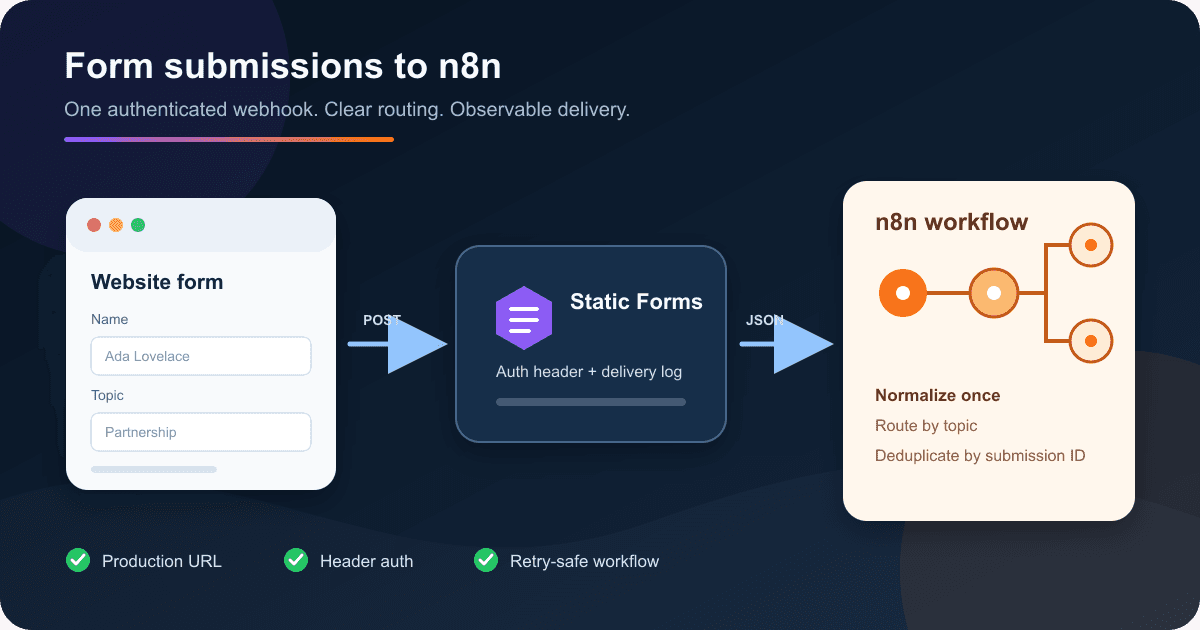
The finished route looks like this:
website form -> Static Forms -> n8n Webhook -> your workflow branches
Static Forms accepts the browser submission and sends a JSON webhook to n8n. Your n8n workflow can then add the lead to a CRM, notify a team, or route support questions without putting the n8n URL in the website.
Start with the n8n Webhook node
Create a workflow in n8n and add a Webhook node. Set its HTTP method to POST.
The node shows two URLs:
- The Test URL is registered when you choose Listen for Test Event or run the unpublished workflow. Use it while building.
- The Production URL is registered when you publish the workflow. This is the URL to save in Static Forms.
n8n documents the difference in its Webhook node reference. If a webhook worked during setup but now returns 404, check the URL before changing any nodes.
For the response, choose an immediate response with a success status. Static Forms treats a 2xx response as accepted. A slow workflow should acknowledge the webhook first and continue its expensive work afterward instead of keeping the request open.
See the real payload before mapping fields
Select Listen for Test Event in n8n. In Static Forms, open the form, go to Edit -> Delivery, and find the Webhook card. Paste the n8n Test URL temporarily, then choose Send test.
The test event is useful for checking connectivity, but it is deliberately synthetic. A real submission uses form.submitted and carries the submitted fields under data.formData:
{
  "event": "form.submitted",
  "timestamp": 1765094400,
  "data": {
    "submissionId": "f8a4c2e1-7b3d-4e9a-a1c5-2d8f6b0e4a7c",
    "formData": {
      "name": "Ada Lovelace",
      "email": "ada@example.com",
      "topic": "Partnership",
      "message": "Could we discuss an integration?"
    },
    "recipientEmail": "you@example.com",
    "replyTo": "ada@example.com"
  }
}
Treat the field names in your form as an interface. email, topic, and message are easy to map. Names such as field2 become a maintenance problem six months later.
The Webhook node normally exposes the request body under $json.body. The small Code node below also accepts a body-only fixture, which makes it convenient for manual runs and pinned test data:
const envelope = $json.body ?? $json;
const data = envelope.data ?? {};
const form = data.formData ?? {};

if (!['form.submitted', 'webhook.test'].includes(envelope.event)) {
  throw new Error(`Unexpected event: ${String(envelope.event)}`);
}

return [{
  json: {
    event: String(envelope.event),
    submissionId: String(data.submissionId ?? ''),
    name: String(form.name ?? ''),
    email: String(form.email ?? ''),
    topic: String(form.topic ?? 'Other'),
    message: String(form.message ?? ''),
  },
}];
Put this node directly after the Webhook node and call it Normalize submission. Downstream nodes now read predictable fields such as $json.email and $json.topic instead of repeating a long path in every expression.
Do not silently accept an event type you do not understand. A failed execution is easier to diagnose than a workflow that sends the wrong payload to the wrong system.
Add authentication before switching to production
A hard-to-guess webhook path is useful, but it should not be your only check. n8n's Webhook node supports Header auth.
Create a Header auth credential in n8n with a name such as X-StaticForms-Token and a long random value. In the Static Forms Webhook card:
- Choose Custom header under Authentication.
- Enter the same header name and value.
- Keep the value in your password manager. Do not put it in the website, article, screenshots, or workflow notes.
Static Forms adds the header on its server-side request. The visitor's browser never receives it.
If the value leaks, replace it in n8n and Static Forms. Do not log request headers while troubleshooting unless your logging layer redacts the authentication value.
Route the submission without building a maze
Add a Switch node after Normalize submission and route on $json.topic. A small workflow might use these branches:
| Topic | Destination |
|---|---|
Sales |
Create or update a CRM lead |
Support |
Open a helpdesk ticket |
Partnership |
Notify the partnerships channel |
| Anything else | Send to a review queue |
Always keep a fallback output. Forms change, people tamper with requests, and old pages can keep submitting values after you edit the current version. Dropping an unknown topic is usually worse than placing it in a queue for review.
Validate the email before giving it to another service. Client-side type="email" helps visitors, but webhook data still needs to be treated as untrusted input. Avoid placing raw form values into SQL strings, HTML, shell commands, or expressions that execute code.
Make retries safe
Static Forms retries transient webhook failures and sends the same Idempotency-Key for each attempt. The key includes the event type and submission ID. Production deliveries also include data.submissionId, which is the useful business identifier inside n8n.
Retries mean a downstream action can run more than once if n8n accepts a request and then fails before recording completion. For actions where duplicates matter, store the submission ID before creating the CRM record, invoice, ticket, or notification. If that ID already exists, stop that branch or update the existing record.
Do not return an error merely because a later notification failed if n8n has already completed the important write. That response asks the sender to retry the entire delivery. Decide which action is the source of truth, then make the workflow's response match that decision.
Move from test to production
Once the test payload reaches n8n:
- Publish the n8n workflow.
- Copy the Webhook node's Production URL.
- Replace the Test URL in the Static Forms Webhook card.
- Enable the Webhook card and save the Delivery page.
- Submit the deployed website form with recognizable synthetic data.
Check all three records: the submission in the Static Forms inbox, the webhook attempt under Delivery logs, and the production execution in n8n. A green n8n test does not prove the browser form is wired correctly, and a thank-you page does not prove the workflow finished.
The Static Forms delivery reference documents the endpoint, authentication, test, and log controls. If you still need the browser-side form, start with the plain HTML guide rather than sending directly from browser JavaScript to n8n.
Diagnose failures by the last successful hop
| What you can see | Where to look next |
|---|---|
| No submission in Static Forms | Check the form action, method, form key, browser response, and domain allowlist |
| Submission exists, webhook test fails | Check the n8n URL, Header auth values, TLS certificate, and whether the workflow is listening or published |
| Test works, production form does not trigger n8n | Confirm the Webhook card is enabled and the Production URL replaced the Test URL |
| n8n receives the request, but fields are empty | Inspect the Webhook node output and map from body.data.formData |
| Static Forms shows repeated delivery failures | Read the response status and body in Delivery logs, then inspect the matching n8n execution |
| One submission creates two downstream records | Deduplicate with data.submissionId before the side effect |
For a self-hosted n8n instance behind a reverse proxy, verify that n8n generates the public HTTPS URL rather than an internal host. n8n has a current reverse-proxy webhook URL guide for that setup.
Production checklist
- The Static Forms card contains the n8n Production URL, not the Test URL.
- The n8n workflow is published.
- Header auth is enabled at both ends and the value is stored outside the site code.
- The workflow validates the event and normalizes
data.formDataonce. - Every Switch has a fallback path.
- Duplicate-sensitive actions check
data.submissionIdfirst. - The webhook returns a
2xxresponse quickly enough for the sender. - A deployed browser submission appears in the Static Forms inbox, Delivery logs, and n8n production executions.
- Logs and screenshots do not expose the webhook URL or authentication value.
Related Articles
How to Send Form Submissions to Google Sheets
Connect Google Sheets to your Static Forms account with one click. Every form submission is appended as a new row — no code, no Zapier, no Apps Script.
Bearer vs Basic vs Custom Header Auth for Form Webhooks
Choose Bearer, Basic, or a custom header for form webhooks. See exact request formats, safe Node.js validation, token rotation, and 401/403 fixes.
Send HTML Form Submissions to Telegram Safely
Send HTML form submissions to Telegram without exposing your bot token. Includes bot setup, accessible HTML, security checks, and two-hop testing.







































