

A Practical GDPR Checklist for Website Contact Forms
Most contact forms are small data-processing systems. They collect a name, an email address, and a message, then pass that information through a form service, an inbox, and sometimes a CRM or automation. A GDPR review has to cover that whole route, not just the checkbox beside the submit button.
This checklist is practical information for teams preparing a website form. It is not legal advice, and it cannot decide your lawful basis or obligations for you. If the form handles health, financial, employment, children's, or other sensitive data, involve a qualified privacy professional before launch.
Map the data flow before editing the form
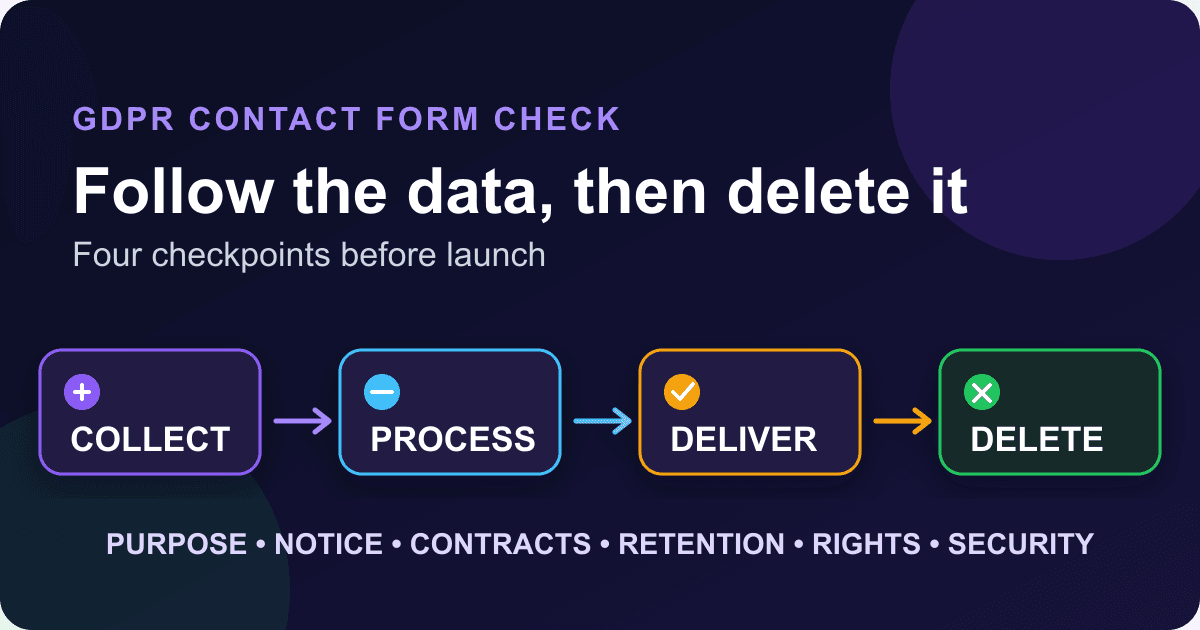
Write down every place a submission goes. A typical flow looks like this:
- A visitor enters information on your website.
- The browser sends it to your form processor.
- The processor stores or emails the submission.
- A webhook, spreadsheet, help desk, CRM, or notification service may receive a copy.
- Backups, delivery logs, and operational logs may keep related data for a different period.
- Someone eventually deletes the submission from each place that still holds it.
Name the organisation that decides why and how the form data is used. That organisation is usually the controller. List each service that handles the data on its behalf, and note whether the service is a processor, another controller, or something that needs a closer contractual review. Article 28 of the GDPR sets requirements for controller-processor contracts.[1]
Do not stop the map at "email." Check forwarding rules, shared mailboxes, mobile mail clients, exports, webhook destinations, and staff who can download submissions. A deletion policy that covers the form dashboard but leaves five spreadsheet exports behind is not much of a deletion policy.
Give every field a reason to exist
The GDPR principles include purpose limitation, data minimisation, storage limitation, accuracy, security, and accountability. The European Commission describes data minimisation plainly: collect only the personal data needed for the stated purpose.[2]
Review the form one field at a time:
- What will we do with this value?
- Is it needed before we reply, or could we ask for it later?
- Is the field optional in practice as well as in the markup?
- Does free text invite people to disclose information we do not want?
- Will a hidden analytics or attribution field add personal data to the submission?
A basic contact form rarely needs a date of birth, full postal address, company size, and phone number just to answer an email. Remove fields that survive only because they were in the original template.
Free-text boxes deserve extra attention. Add a short instruction such as "Do not include passwords, payment card details, or medical information." The warning does not replace server-side controls, but it tells people what the channel is for and gives your team a reason to reject unsuitable data.
Choose a lawful basis instead of defaulting to consent
Consent is one lawful basis under Article 6, not the automatic answer for every contact form.[1] A request for a quote, a support question, and a newsletter signup can have different purposes and may need different analysis. Document the basis selected for each purpose and why it applies.
If you rely on consent, the EDPB says it must be freely given, specific, informed, and unambiguous. It must also be as easy to withdraw as it was to give.[3] A pre-ticked box, a vague "I agree to everything" statement, or a checkbox required for an unrelated service is a warning sign.
Keep an optional marketing choice separate from the act of sending an enquiry. The form below does that. It does not force a consent checkbox onto the contact request itself.
<form action="https://api.staticforms.dev/submit/YOUR_API_KEY" method="post">
  <label for="contact-name">Name</label>
  <input id="contact-name" name="name" autocomplete="name" required>

  <label for="contact-email">Email</label>
  <input
    id="contact-email"
    name="email"
    type="email"
    autocomplete="email"
    required
  >

  <label for="contact-message">How can we help?</label>
  <textarea
    id="contact-message"
    name="message"
    rows="6"
    maxlength="3000"
    aria-describedby="message-help"
    required
  ></textarea>
  <p id="message-help">
    Do not include passwords, payment card details, or medical information.
  </p>

  <p>
    We use the details above to answer your enquiry.
    Read our <a href="/privacy-policy">privacy notice</a>.
  </p>

  <label>
    <input type="checkbox" name="marketing_consent" value="yes">
    Email me occasional product news. I can unsubscribe at any time.
  </label>

  <button type="submit">Send enquiry</button>
</form>
Replace YOUR_API_KEY with the public form key from your Static Forms workspace. The marketing box is unchecked and optional. If you do not send marketing email, remove it rather than collecting a preference you will never use.
The exact wording and lawful basis depend on your organisation and purpose. Do not copy this example as a legal conclusion. Copy its separation of purposes, then have the wording reviewed for your situation.
Put the privacy information where people can find it
Articles 12 and 13 require information about processing to be concise, transparent, intelligible, and easy to access. When data comes directly from a person, the required information can include the controller's identity and contact details, purpose and lawful basis, recipients, transfers, retention, rights, complaint route, whether the data is required, and relevant automated decision-making.[1]
A link beside the form can lead to the complete notice, but the nearby sentence should still tell the visitor what will happen next. "We use this to answer your enquiry" is more useful than "By submitting, you accept our policy."
Check the notice against the real data-flow map. If submissions go to a CRM and a support desk, a notice that mentions only email is incomplete. If the form records UTM parameters or another identifier, include that in the review too.
Check processor contracts and transfer paths
Ask each form, email, CRM, analytics, and automation provider for its current data processing terms. Confirm what the contract covers, where the relevant data is processed, which subprocessors may receive it, and what transfer mechanism is used when data leaves the EEA. Keep a copy or a durable record of the terms you accepted.
Static Forms publishes a Data Processing Agreement, currently version 2.4 and last updated August 16, 2026.[4] Its EU residency option has a deliberately narrow scope: the EU data residency guide says form data can be stored in Frankfurt, while account data, primary email delivery, and operational logs remain in the United States.[5] That distinction belongs in your vendor review. An EU storage setting does not, by itself, settle every GDPR question.
Your own configuration matters as much as the provider's contract. A webhook that sends every message to a US-based CRM changes the path after the form processor has accepted it. Record that hop rather than treating the first storage region as the location of the whole workflow.
Set retention rules that someone can carry out
"Keep it while useful" is not an operational rule. Choose a period or a decision rule for each copy of the data, assign an owner, and decide how deletion will be verified.
A workable retention record answers these questions:
- When does the clock start?
- Does an open support case pause deletion?
- Who removes data from the form inbox, mailbox, CRM, exports, and backups?
- Which records must be kept for a separate legal obligation?
- How will the team document an exception?
Article 5 says personal data should be kept in identifiable form no longer than necessary for the processing purpose.[1] That does not produce one universal number for contact messages. A sales enquiry, an unresolved complaint, and an abandoned newsletter signup may justify different schedules.
Static Forms' privacy policy describes the service's current storage and deletion terms. Your public notice still needs to describe your organisation's retention choices and every destination you control.[6]
Prepare for access, correction, deletion, and objection requests
A footer email address is not a rights process. Decide who receives a request, how they verify identity without collecting excessive new data, where they search, who can approve an exception, and how they record the outcome.
Build the search list from the data-flow map. It may include the form dashboard, shared inbox, CRM, webhook logs, spreadsheet exports, and support system. Articles 15 through 22 cover rights including access, rectification, erasure, restriction, portability, objection, and safeguards around certain automated decisions.[1] The right response depends on the request and legal context, so your runbook needs an escalation path rather than an automatic "delete everything" button.
Test the process with a dummy submission. Ask a team member who did not design the workflow to locate and remove it. Missing copies tend to show up quickly when someone follows the written steps.
Protect the form and limit who can read submissions
Article 32 requires security measures appropriate to the risk.[1] For a contact-form workflow, start with the basics:
- Use HTTPS for the page, form endpoint, and webhook destinations.
- Give staff individual accounts and only the access they need.
- Turn on multi-factor authentication where the provider supports it.
- Keep secrets out of browser code. A public form key and a private webhook secret are not the same thing.
- Validate field shape and length on the server, even when the browser already checks them.
- Avoid putting personal data in URLs, analytics events, or routine application logs.
- Review exports and old integrations when staff or vendors change.
The appropriate controls depend on the harm a disclosure could cause. A general enquiry form should discourage sensitive details. If you genuinely need special-category data, use a workflow designed and reviewed for that risk rather than stretching a general contact form until it becomes one.
Run a pre-launch privacy test
Submit fictional data through every production path, then trace it.
- Confirm the form shows the nearby privacy text and the full notice opens.
- Check that optional fields and consent choices are genuinely optional.
- Inspect the received submission for hidden or unexpected values.
- Follow the data into email, webhooks, automations, and exports.
- Verify that only the intended staff can see it.
- Withdraw the optional marketing consent through the published route.
- Run your access and deletion procedure on the dummy record.
- Confirm the retention owner knows when the remaining copies will be removed.
Do this again when you add a field or integration. A two-line CRM webhook can change the privacy story even when the visible form stays exactly the same.
Questions teams ask before launch
Does a contact form always need a consent checkbox?
No. Consent is one possible lawful basis, and the correct choice depends on the purpose and circumstances.[1] If you use consent for optional marketing, separate it from the enquiry and make withdrawal easy.[3]
How long can we keep contact-form submissions?
There is no universal retention period for every contact form. Keep personal data no longer than necessary for the stated purpose, account for other legal obligations, and write down a schedule your team can execute.[1][2]
Is a privacy-policy link enough?
The notice must be easy to access and match what the workflow really does.[1] A nearby plain-language sentence helps people understand the immediate purpose, while the linked notice can provide the full details.
Does EU data residency make a form GDPR compliant?
No single infrastructure setting establishes compliance. Residency can affect the transfer and processor review, but lawful basis, transparency, minimisation, retention, rights handling, contracts, and security still need attention.[1][5]
Keep the checklist tied to the real workflow
The cleanest GDPR review starts with a diagram and ends with a deletion test. Remove fields without a purpose, separate optional marketing consent, update the notice to match every destination, and assign retention and rights requests to named roles.
For the implementation side, start with the Static Forms documentation and the GDPR consent form template. Treat the template as markup, not legal approval. Your organisation remains responsible for deciding what it asks, why it asks, and what happens after submission.
Sources
[1] EUR-Lex: Regulation (EU) 2016/679 (GDPR) (Official Journal text dated April 27, 2016; checked September 12, 2026)
[2] European Commission: Principles of the GDPR (checked September 12, 2026; no visible update date)
[3] European Data Protection Board: Guidelines 05/2020 on consent under Regulation 2016/679 (published May 4, 2020; checked September 12, 2026)
[4] Static Forms: Data Processing Agreement (version 2.4; last updated August 16, 2026)
[5] Static Forms: EU Data Residency for Submissions and File Uploads (published July 26, 2026; checked September 12, 2026)
[6] Static Forms: Privacy Policy (last updated July 8, 2026)
Related Articles
Add browser details to a bug report form safely
Build a bug report form that captures page, viewport, language, time zone, and user agent while letting users review the details before sending.
Add a Contact Form to Hexo Without a Backend
Add a no-JavaScript contact form to Hexo, keep it outside fragile theme files, inspect the generated HTML, and test the deployed form safely.
Add a Contact Form to Ghost Without Editing Your Theme
Add a working contact form to Ghost with an HTML card, accessible fields, a thank-you page, spam protection, and a published-page test plan.







































